

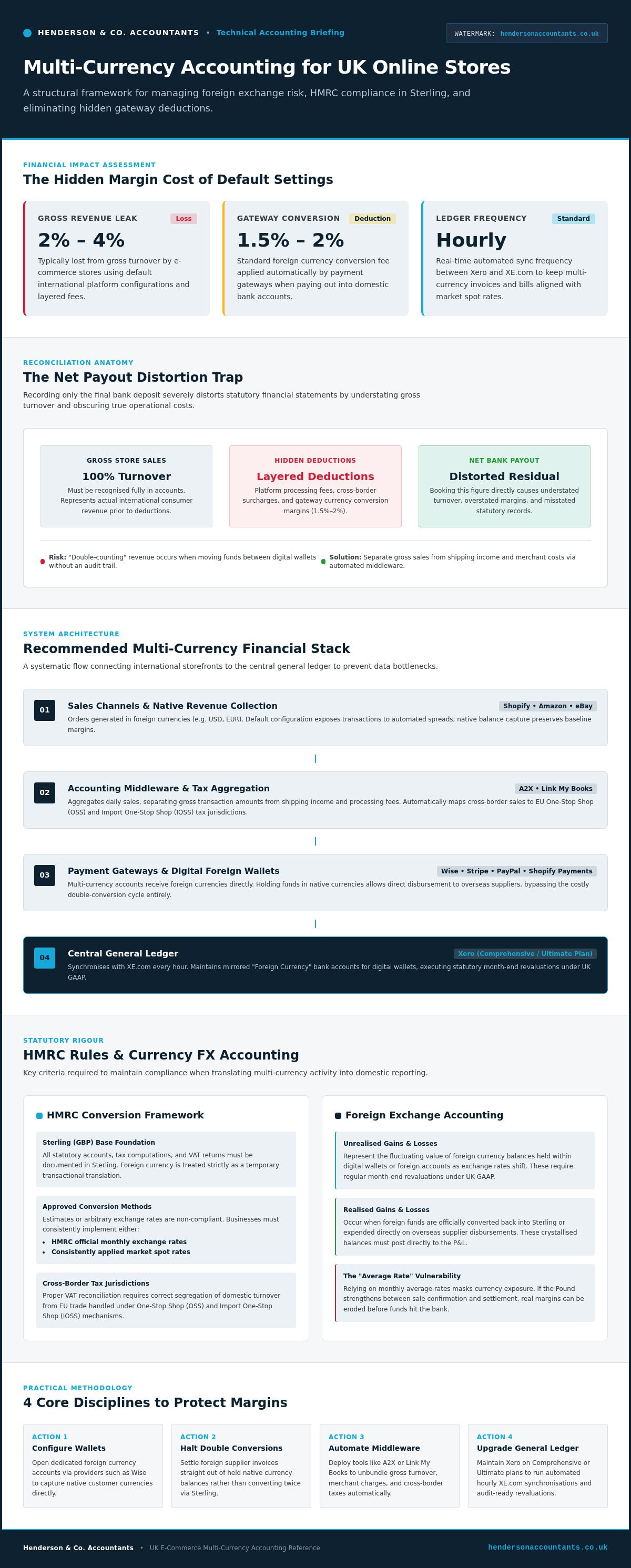
Did you know that e-commerce stores selling internationally through default platform settings typically lose between 2% and 4% of their gross revenue to layered fees and automatic currency conversions? It's a frustrating reality for many UK sellers who see their hard-earned margins nibbled away by processes they can't see. You've likely felt the headache of manual reconciliation, trying to make sense of Shopify or Amazon payouts that don't quite match your bank balance. Managing multi-currency accounting for online stores shouldn't feel like a constant battle against your own data.
We understand that while global expansion is exciting, the back-office complexity can be overwhelming. You want clear visibility of your global profit margins without spending hours untangling VAT treatments or worrying about HMRC compliance. This guide is designed to help you master international trade by building a robust financial stack that automates the heavy lifting. We'll explore how to reconcile foreign sales accurately, manage exchange rate volatility, and ensure your foreign exchange gains and losses are recorded correctly every time.
Key Takeaways
- Identify and protect your margins by uncovering the hidden 2-4% of revenue often lost to layered gateway fees and automatic currency conversions.
- Discover how to configure Xero as your central financial hub to automate multi-currency accounting for online stores and eliminate manual data entry.
- Understand the essential HMRC rules for converting foreign sales to Sterling to ensure your VAT returns and annual accounts remain fully compliant.
- Learn how to set up dedicated foreign currency bank accounts and digital wallets to stop the "double conversion" cycle and keep more of your profit.
- Master a simple, step-by-step workflow for reconciling complex Shopify or Amazon payouts against your gross sales and merchant fees.
The Challenges of Multi-Currency Accounting for UK Online Stores
Expanding into international markets is a huge win for any UK brand, yet the excitement of seeing orders in USD or EUR often masks a growing bookkeeping storm. Many sellers start by treating foreign sales like domestic ones, only to find that their accounts become a tangled mess of mismatched figures. Effective multi-currency accounting for online stores requires moving beyond simple conversions to understand how money moves across borders.
A common trap is relying on "average" exchange rates for the month rather than real-time market data. Whilst this might save time, it ignores the reality of foreign exchange risk. If the Pound strengthens significantly between the moment a customer clicks "buy" and the moment the funds reach your bank, your expected profit can vanish. You also need to track both realised and unrealised gains. An unrealised gain is simply the fluctuating value of the foreign currency you're holding; it only becomes "realised" once you actually convert it or spend it. Both must be recorded correctly on your P&L to show your true financial position.
Reconciliation: The Number One eCommerce Headache
The biggest frustration for most sellers is why their sales platform reports never match their bank balance. This gap exists because payment gateways like Shopify or Amazon deduct their fees and currency conversion spreads before the money ever hits your account. If you only record the net payout, you're understating your turnover and overstating your margins. There's also a risk of "double counting" revenue if you move funds between digital wallets and your main business account without a clear trail. This makes multi-currency accounting for online stores a task that demands precision from the very first transaction.
HMRC and Statutory Compliance Requirements
HMRC is very specific about how you must handle international trade. For your annual accounts and VAT returns, every transaction must be recorded in Sterling (GBP). You cannot simply guess the conversion rate. You must choose an approved method, such as using HMRC’s official monthly exchange rates or consistent market spot rates, and stick to it. Your base currency remains the foundation of your reporting; everything else is just a temporary translation that must eventually be brought back to the Pound to satisfy the taxman. Failing to organise this properly from the start can lead to messy books that are difficult to fix as you scale.
Building Your Multi-Currency Tech Stack with Xero
Xero is the preferred engine for multi-currency accounting for online stores because it handles the heavy lifting of currency conversion with clinical precision. By syncing with XE.com every hour, the platform ensures your invoices and bills reflect the most current market conditions. To unlock these features, you'll need to be on the Comprehensive or Ultimate plan. Without this foundation, you'll find yourself trapped in a cycle of manual spreadsheets that quickly become outdated and prone to error.
Setting up "Foreign Currency" bank accounts in Xero to mirror your digital wallets is a vital first step. If you hold USD in Shopify Payments or EUR in a Wise account, your Xero dashboard should reflect those specific balances. This setup allows you to follow statutory exchange rate rules for accounts, ensuring that your month-end revaluations are compliant with UK GAAP. It replaces guesswork with a clear, automated trail of how your money moves.
Integrating Sales Channels: Shopify, Amazon, and eBay
Raw data from sales platforms is often too messy for direct accounting. This is where middleware like A2X or Link My Books becomes essential. These tools aggregate daily sales and separate gross revenue from shipping income and tax. They also help you manage the complexities of EU VAT through the One-Stop Shop (OSS) or Import One-Stop Shop (IOSS) schemes. Automating the flow of transaction data ensures that every sale is mapped to the correct tax jurisdiction without the risk of human error.
Connecting Payment Gateways: Stripe, PayPal, and Wise
A common mistake is treating a Stripe or PayPal payout as a single income line. These payouts are usually net of fees and cross-border surcharges, which can hide the true cost of your international sales. By using a multi-currency business account like Wise, you can receive funds in their native currency and avoid the 1.5% to 2% conversion fees charged by gateways. You can then pay overseas suppliers directly from these balances, bypassing the "double conversion" trap entirely. This keeps your margins intact and your bookkeeping clean.
If you're feeling unsure about your current workflow, our team can help with a professional Xero cloud accounting setup to ensure your international growth is built on a stable foundation.
Managing the Costs: FX Rates, Fees, and Margins
Hidden fees are the silent margin killers for UK brands selling abroad. When you sell in USD but settle in GBP, your payment gateway doesn't just charge a transaction fee; it also applies a currency spread. This spread is the difference between the mid-market rate, which is the "real" exchange rate you see on Google, and the "tourist" rate offered by many high-street banks or default processors. These layered costs quietly erode between 2% and 4% of gross revenue. For a business with tight margins, this can represent a significant portion of your take-home profit.
To keep your books accurate, you must move away from net reporting. Recording only the final amount that hits your bank account hides the true cost of doing business internationally. Modern multi-currency accounting for online stores should always record the gross sale price. By categorising FX fees as a separate expense, you gain the clarity needed to make informed decisions about your pricing and platform choices. This level of detail is what allows you to track "Currency Adjusted" margins in your management accounts.
Comparing Conversion Methods
Direct bank conversions are often the most expensive way to move money. Using third-party services or virtual IBANs allows you to hold currency in a foreign wallet, such as a USD or EUR account. This is particularly useful if you also pay overseas suppliers or marketing agencies in those same currencies. By matching your foreign income with your foreign expenses, you avoid the conversion fee entirely. The table below illustrates how a seemingly small 2% fee impacts a business as it scales.
| Annual International Turnover | FX Fee (2% Average) | Profit Lost to Conversion |
|---|---|---|
| £100,000 | £2,000 | £2,000 |
| £500,000 | £10,000 | £10,000 |
| £1,000,000 | £20,000 | £20,000 |
Strategic Currency Hedging for Growing Brands
As your store grows, you might consider currency hedging to protect your business from sudden swings in GBP/USD or GBP/EUR. Hedging is a strategy used to lock in an exchange rate for a future date, providing certainty for your costs. This is where the value of an Outsourced Finance Director becomes clear. They don't just look at past transactions; they help you set a forward-looking strategy that stabilises your cash flow. By proactively managing multi-currency accounting for online stores, you can build a stable foundation that isn't at the mercy of volatile global markets.
A Step-by-Step Guide to Reconciling Multi-Currency Payouts
Reconciling multi-currency accounting for online stores doesn't have to be a manual slog. By following a structured workflow, you can ensure your books remain clean and your reporting stays accurate. This process replaces the anxiety of mismatched balances with a steady, predictable routine that keeps you in control of your global finances.
- Step 1: Check your base currency. Ensure your Xero organisation is set to British Pounds (GBP). This is the foundation for all your HMRC filings, even if the majority of your sales happen in USD or EUR.
- Step 2: Capture gross sales data. Use an automation tool to capture the gross value of every order. This ensures you aren't just booking the net cash received, which would hide merchant fees and distort your turnover figures.
- Step 3: Match payouts to foreign accounts. When Shopify or Amazon sends a payout in USD, reconcile it against your USD bank feed in Xero. The balance in your software should always mirror the balance in your digital wallet or bank.
- Step 4: Record realised gains and losses. When you eventually move those funds back into your GBP account, Xero will calculate the difference between the transaction rate and the conversion rate. This is recorded as a realised exchange gain or loss on your P&L.
If you're struggling to get these steps right, our bookkeeping experts can design an automated workflow that handles the technical details for you.
Handling Refunds and Disputes
Refunds add another layer of complexity to multi-currency accounting for online stores. If you sold a product when the exchange rate was 1.25 and refund it when it's 1.30, you may end up paying back more in GBP than you originally received. This is known as a "currency round-trip" loss. Best practice is to record the refund in the original currency and let your software calculate the FX impact automatically. For chargebacks, ensure you record the original sale reversal and the associated processor fee separately to maintain a clear audit trail.
Monthly Review: Checking the Foreign Currency Balance
At the end of each month, run the "Foreign Currency Exposure" report in Xero. This tool shows you exactly where your money is held and how much its value has shifted due to market movements. You should verify that your digital wallet balances, such as those in Wise or Airwallex, match your Xero ledger to the penny. Comparing your sales platform's "pending payout" total with your Xero "clearing account" balance is the quickest way to spot reconciliation errors before they impact your VAT return.
Scaling Internationally with Henderson & Co. Accountants
Scaling a brand across borders is a massive achievement, but it often brings a weight of administrative burden that can stifle your creativity. At Henderson & Co., we specialise in taking that weight off your shoulders. We don't just record transactions; we build the automated infrastructure that makes multi-currency accounting for online stores feel effortless. Our goal is to replace your manual reconciliation stress with a streamlined workflow that gives you back your time.
A professional Xero Cloud Accounting Setup is the first step in this journey. We ensure your software is configured to handle the specific demands of multi-channel selling, from mapping Shopify payouts to managing digital wallets like Wise or Airwallex. As you reach international VAT thresholds, such as the €10,000 distance selling limit in the EU, our team provides the strategic tax planning needed to stay compliant. We help you navigate IOSS and OSS requirements so you can focus on your customers instead of HMRC paperwork.
Your Outsourced Finance Director for Global Growth
Understanding your numbers is the key to making smart stock decisions. If you're selling well in the US but the Pound is strengthening, your real-world profit might be lower than your sales dashboard suggests. Our Outsourced Finance Director services bridge this gap by providing high-level oversight of your international performance. We help you interpret global sales data to manage cash flow across multiple time zones and currencies. This level of insight ensures you aren't just growing turnover, but building a sustainable, profitable business that can weather currency volatility.
Ready to Organise Your Global Finance?
Managing international reporting shouldn't be the thing that keeps you awake at night. A specialist eCommerce accountant is a necessity for any brand looking to scale beyond the UK market. We replace the confusion of foreign exchange gains and losses with a sense of calm control, ensuring your annual accounts reflect the true health of your business. If you're ready to move away from messy spreadsheets and into a streamlined, automated future, book a consultation with our eCommerce experts today. Let's ensure your global expansion is built on a foundation of solid, reliable data.
Take Control of Your Global Financial Future
Mastering international trade is a significant milestone for any UK business. By moving away from manual spreadsheets and adopting a tech-led approach, you can transform your back office into a genuine growth engine. We've explored how a robust setup in Xero, combined with smart multi-currency bank accounts, protects your margins from hidden fees and ensures your HMRC reporting remains accurate. Effective multi-currency accounting for online stores isn't just about recording what happened; it's about gaining the real-time visibility you need to scale with confidence.
At Henderson & Co., we're more than just bookkeepers. As Xero Certified Platinum Partners with a specialist eCommerce accounting department, we provide award-winning proactive financial advice tailored to your specific goals. We understand the unique pressures of global selling and are here to help you navigate every hurdle. Whether you're untangling VAT or looking for a strategic partner to manage your currency risk, we're ready to support your journey.
Streamline your global store with Henderson & Co. Accountants today and start building your business on a foundation of clarity and control. Your international expansion is an exciting chapter, and we're here to ensure you succeed at every step.
Frequently Asked Questions
Do I need a separate bank account for every currency I sell in?
No, you don't need a separate account for every currency, but it's often the smartest move for your margins. Using a multi-currency account allows you to receive and hold native currencies like USD or EUR without forced conversions. This setup lets you pay international suppliers directly from those balances, bypassing the high fees charged by traditional banks. It's a key strategy for protecting your profit whilst simplifying your daily bookkeeping routine.
How does Xero calculate exchange rate gains and losses?
Xero handles this by comparing the exchange rate on the day a transaction is recorded with the rate on the day it's settled. It also performs automatic month-end revaluations for any foreign currency bank balances you hold. These fluctuations appear on your reports as realised or unrealised gains and losses. This automation ensures that multi-currency accounting for online stores remains precise without you needing to track every market movement manually.
What is the best exchange rate to use for my VAT returns?
HMRC requires you to use a consistent and approved method for all conversions. Most UK sellers use either the official HMRC monthly exchange rates or a reliable market spot rate. Once you've selected a method, you must apply it consistently to all your VAT returns. You can't switch between rates just to lower your tax bill. Sticking to one source ensures your records are transparent and fully compliant with current UK regulations.
Can I automate the reconciliation of Amazon payouts in different currencies?
Automation is the most reliable way to handle complex Amazon payouts. By using middleware like A2X or Link My Books, you can sync your Amazon data directly with Xero. These tools automatically separate gross sales, VAT, and merchant fees from the net payout. This removes the manual work of untangling different currencies and ensures that your books accurately reflect your true turnover and international margins every time you reconcile.
How do I handle VAT for sales to the EU under the OSS scheme?
If you exceed the €10,000 distance selling threshold, the OSS scheme allows you to report EU VAT through a single return. You charge the VAT rate applicable in the customer's country at the point of sale. Using automated tools to map these transactions ensures you're collecting the right amount of tax. This is a vital part of multi-currency accounting for online stores, as it prevents costly compliance errors across multiple European jurisdictions.
What happens if the exchange rate changes between the sale and the payout?
Any change in value between the sale date and the payout date results in an exchange gain or loss. If the Pound weakens before the funds hit your account, the sale is worth more in GBP, resulting in a gain. If the Pound strengthens, you'll record a loss. Xero tracks these movements automatically, ensuring your profit and loss statement reflects the actual value of the money you've earned once it's settled.
Is it better to convert foreign currency immediately or hold it in a digital wallet?
Holding currency in a digital wallet is usually the better option if you have international costs, such as paying overseas suppliers. By keeping funds in their native currency, you avoid unnecessary conversion fees and "double conversion" traps. However, if your expenses are purely in Sterling, you might choose to convert when rates are favourable. A specialist eCommerce accountant can help you decide which strategy best protects your cash flow and long-term margins.


