

Xero can be HMRC-recognised for Making Tax Digital without making every tax task automatic. If you’re asking “is xero good for making tax digital”, the answer depends on whether you need to meet the rules for VAT, Income Tax or both, and on how you keep your records.
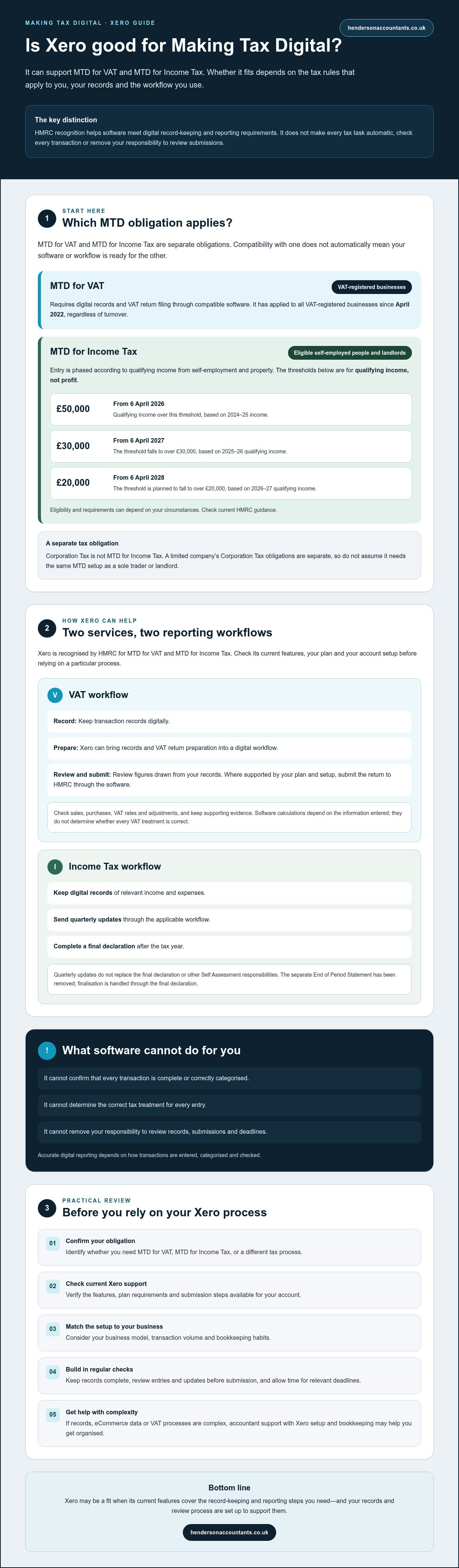
It helps to separate the two obligations. VAT-registered businesses must keep digital records and file VAT returns using compatible software. From 6 April 2026, MTD for Income Tax applies to qualifying self-employed people and landlords with qualifying income over £50,000, based on their 2024-25 income.
This guide explains where Xero can help, what you’ll still need to check and do, and how to decide whether it fits your business. It covers the differences between the two MTD obligations, digital records and submissions, then gives practical points to consider when choosing and setting up your software.
Key Takeaways
- Whether is xero good for making tax digital depends on the tax service you need and how your business records income and expenses.
- Check that Xero’s current features cover the record-keeping and reporting steps required for your MTD obligation.
- Choose a setup that matches your business model, transaction volume and bookkeeping habits.
- Use a practical checklist to review eligibility, digital records and reporting before relying on your process.
- If your records, eCommerce data or VAT processes are complex, accountant support with Xero setup and bookkeeping may help you get organised.
Is Xero good for Making Tax Digital? Start with the requirement you need to meet
Is xero good for making tax digital? It may be, but the answer depends on which MTD rules apply to you and how your business is set up. MTD for VAT and MTD for Income Tax are separate obligations. Compatibility with one doesn’t automatically mean your software or workflow is ready for the other.
HMRC’s Making Tax Digital (MTD) programme moves parts of tax administration towards digital records and software-based reporting. Compatible software can help you keep required records and send information to HMRC. It won’t check that every transaction is complete, determine the correct tax treatment or remove your responsibility to review submissions.
What does Making Tax Digital require?
In practice, MTD means keeping relevant financial records digitally and using software that can meet the requirements of the tax service that applies to you. The records, reporting steps and deadlines depend on your taxpayer type and current HMRC rules. Identify your obligation first, then check that the software supports the necessary tasks.
Which MTD regime might apply to you?
If you’re VAT-registered, MTD for VAT requires digital records and VAT return filing through compatible software. It has applied to all VAT-registered businesses since April 2022, regardless of turnover. MTD for Income Tax is different: it applies to eligible self-employed people and landlords, with entry phased according to qualifying income from self-employment and property.
- From 6 April 2026: the rules apply to those with qualifying income over £50,000, measured using the 2024-25 tax year.
- From 6 April 2027: the threshold falls to over £30,000, based on qualifying income for 2025-26.
- From 6 April 2028: the threshold is planned to fall to over £20,000, based on 2026-27 qualifying income.
These thresholds concern qualifying income, not profit. Check your circumstances against current GOV.UK guidance, as eligibility and requirements can depend on your situation.
Corporation Tax is not MTD for Income Tax. A limited company’s Corporation Tax obligations are separate, so don’t assume a company needs the same MTD setup as a sole trader or landlord. Xero can support digital processes, but accurate records still depend on how transactions are entered, categorised and checked. If you’re unsure which regime applies, confirm that before choosing your software workflow.
How Xero can support MTD for VAT and Income Tax
Xero’s role depends on the MTD service you need and how your account is configured. Xero is recognised by HMRC for MTD for VAT and MTD for Income Tax, but check its current features, your plan and the workflow you intend to use before relying on it. Software can help organise records and send information; it can’t ensure every entry is accurate or that you’ve met every tax obligation.
Using Xero for MTD for VAT
For VAT, Xero can bring transaction records and VAT return preparation into a digital workflow. You can review the figures drawn from your records and, where supported by your plan and setup, submit the return to HMRC through the software. Check Xero’s current submission steps and any plan requirements before filing.
Pay close attention to the entries behind the return. Software calculations rely on the information recorded and can’t determine whether a transaction’s VAT treatment is correct. Check that sales, purchases, VAT rates and adjustments are recorded appropriately, and keep supporting evidence. If you’re unsure about your setup or VAT process, an accountant can help review it.
Using Xero for MTD for Income Tax
MTD for Income Tax has a different reporting workflow from VAT. Eligible users need to keep digital records and send quarterly updates, then complete a final declaration after the tax year. Xero’s current MTD for Income Tax support is intended to help with these steps, but check which tasks are available in your account and whether your own or an agent-managed setup suits you. GOV.UK explains the Making Tax Digital for Income Tax requirements.
Quarterly updates don’t replace your final declaration or other Self Assessment responsibilities. Review each update before submission, check that your records are complete and allow time to meet the relevant deadlines. The separate End of Period Statement has been removed from the process, with finalisation handled through the final declaration. Confirm the current Xero workflow and HMRC guidance for your circumstances rather than treating software recognition as a guarantee of complete compliance.
A well-configured system can make digital bookkeeping and reporting more orderly, but the result depends on regular checks and clear processes. If you’d like help reviewing your setup, Xero cloud accounting setup is one area where Henderson & Co. Accountants can support businesses, alongside bookkeeping and VAT return preparation.
Xero for Making Tax Digital: compare it with your actual business needs
Start with your day-to-day records, not just an MTD label. Ask whether the workflow can capture your transactions, keep the records you need and support the relevant reporting. If you’re wondering “is xero good for making tax digital”, consider what you need to record, how often you’ll review it and whether your existing systems can work reliably with Xero.
| Business type | What to consider | Possible workflow focus |
|---|---|---|
| Sole trader | Whether MTD for Income Tax applies to you, and how you track business income and expenses. | Organise records so you can review and report the relevant figures on time. |
| Landlord | How you record property income and expenses, and whether you also have self-employment income. | Check that the setup reflects your income sources and supports the required reporting. |
| VAT-registered company | How sales, purchases and VAT are recorded, including any adjustments or multiple sales channels. | Keep digital VAT records and prepare the figures for the relevant return and submission process. |
These are starting points, not a substitute for checking your own tax position. A sole trader or landlord may need to consider Income Tax reporting, while a VAT-registered company will need a suitable VAT workflow. A business can have more than one relevant obligation, so check that both the software and process cover each one.
When Xero may be a practical fit
Xero may suit a business that wants cloud access and a more organised bookkeeping process. Its usefulness depends on whether you’ll keep records up to date and can interpret the reports. For an eCommerce seller, check how sales channels, payment providers, refunds and fees will flow into the accounts. Don’t assume every platform connects automatically. Confirm current integrations, configuration needs and how you’ll reconcile transactions before settling on a setup.
When to check alternatives or seek advice
Pause for a closer review if you have complex VAT treatments, several sales channels or incomplete historical records. These can make it harder to produce dependable figures, whichever software you use. Another compatible product may better suit your working preferences or records. A professional review can help assess your bookkeeping workflow and Xero configuration, but it doesn’t replace HMRC guidance or confirm your eligibility. Choose a system you can maintain, check and use consistently.
How to prepare Xero for Making Tax Digital: a practical checklist
A careful setup can make digital records easier to maintain and reporting easier to review. Before relying on Xero, work through these checks for the specific MTD obligation that applies to you.
- Confirm your tax position. Identify whether you need to meet MTD for VAT, MTD for Income Tax or both. Check your taxpayer type, eligibility and start date against current HMRC guidance. Don’t assume the rules for a company are the same as those for a sole trader or landlord.
- Check the required software functions. Confirm that Xero currently supports the records, updates or return submissions you need. Check the features available on your plan and whether your intended setup can connect to the relevant HMRC service. Note what you’ve checked and any questions for your accountant.
- Prepare your existing data. Review opening balances and outstanding transactions before you begin. Check the figures against your previous records, and decide how to handle gaps or corrections instead of carrying unexplained differences into the new system.
- Set up categories and tax settings. Organise the categories you’ll use to record income and expenses. If you’re VAT-registered, check the VAT settings and transaction tax rates carefully. Software applies the settings you select, so an automatic calculation doesn’t confirm that a transaction’s tax treatment is correct.
- Connect and check your record sources. Organise bank feeds, invoices and supporting documents so transactions can be matched and reviewed. If you sell online, check how sales channels and payment providers feed into Xero. Reconcile settlements against sales, fees and refunds so the records reflect what happened.
- Test the workflow before a deadline. Review reports and check that you can find the figures and evidence you’ll need. Walk through the relevant submission steps without assuming a report is ready to file. Before sending tax information, have a person review the underlying records, investigate unusual balances and confirm the figures are complete.
Keep the process manageable by deciding who will review transactions and how often you’ll check for missing records. If the setup involves several sales channels, complex VAT entries or historical data that needs attention, have the workflow reviewed before relying on it for a filing deadline.
For help putting these checks into practice, explore Xero cloud accounting setup support from Henderson & Co., alongside bookkeeping and VAT return preparation.
Getting Xero and Making Tax Digital support from an accountant
Setting up Xero can take more thought if your records are complex, online sales come through several channels or you’re unsure how your VAT processes should work. An accountant can help shape a practical workflow, check how records are organised and identify questions to resolve before you rely on the system for reporting.
Henderson & Co. provides Xero cloud accounting setup, bookkeeping, eCommerce accounting and VAT return preparation. This support can help you organise your records and review your bookkeeping or VAT processes. You remain responsible for providing complete, accurate information, checking the figures and meeting your tax obligations. Be clear about which tasks you expect the accountant to handle and which you’ll manage.
What to ask before choosing Xero support
Start by discussing the MTD requirements that apply to your business. Ask what the support covers, what remains your responsibility and how the work will fit your existing bookkeeping. Explain which sales channels and payment providers you use, how you currently record transactions, and whether you need help reviewing VAT processes or preparing VAT returns.
Agree how records will be checked and what information you’ll need to provide. Find out who will review transaction coding, investigate discrepancies and confirm figures before any filing or submission. Clear responsibilities help avoid assuming that software or an accountant will automatically catch every missing entry.
Make your next step clear and manageable
Before discussing your setup, gather the details that will help explain your current position:
- Your business structure and the types of income you receive.
- The accounting software and bookkeeping process you use now.
- Details of sales channels, payment providers and any VAT processes.
- Relevant HMRC correspondence or guidance you’re working from.
This gives you a useful starting point for asking whether Xero fits your records and what changes a new setup may involve. If you’re still weighing up “is xero good for making tax digital”, a discussion about your actual workflow can make the decision less abstract. Henderson & Co. can discuss Xero setup, bookkeeping, eCommerce accounting and VAT return preparation in the context of your business. Talk to Henderson & Co. about your Xero setup.
Choose an MTD setup that works for your business
So, is xero good for making tax digital? It can support MTD, but the right fit depends on whether you need to manage VAT, Income Tax or both, and how well your records and reporting workflow are set up. Check current HMRC requirements and Xero’s features for your specific obligation before deciding.
Software can help organise records and submit information, but it can’t guarantee your entries are complete or that the tax treatment is correct. Regular checks matter. If your records are complex, you sell through multiple online channels or you’re unsure about your VAT process, practical setup support may make the next steps clearer.
Henderson & Co. supports businesses across the UK with Xero cloud accounting setup, specialist eCommerce accounting, bookkeeping and VAT return preparation. If you’d like to discuss how your software and compliance workflow could fit together, talk to Henderson & Co. about your Xero setup.
With a clear process in place, you can approach digital record-keeping with greater clarity and confidence.
Frequently Asked Questions
Is Xero compatible with Making Tax Digital?
Yes, Xero is HMRC-recognised for MTD for VAT and MTD for Income Tax, but the features you need depend on the service and your account setup. If you’re asking “is xero good for making tax digital”, check that your plan and configuration support the specific records and submissions required. Confirm current Xero functionality and HMRC guidance before relying on a feature. Compatible software supports digital processes, but doesn’t ensure accurate records or tax treatment.
Can I use Xero for MTD for VAT?
Yes, Xero may support digital VAT records, return preparation and submission when your plan, settings and access meet current requirements. Check Xero’s latest guidance to confirm the functions available in your account before filing. You’re still responsible for reviewing transaction coding and deciding whether the VAT treatment is correct. Keep appropriate supporting evidence, check the return figures and submit by the applicable deadline.
Does Xero support Making Tax Digital for Income Tax in 2026?
Xero is HMRC-recognised for MTD for Income Tax, but confirm which features and workflows are currently available for your account before relying on them. Income Tax rules are separate from MTD for VAT and apply only to eligible taxpayers. Check your start date, reporting duties and the software steps needed for quarterly updates and the final declaration against current HMRC guidance and Xero information.
Who has to use Making Tax Digital for Income Tax?
MTD for Income Tax applies to eligible self-employed people and landlords, not automatically to every business or company. From 6 April 2026, the rules apply to those with qualifying income over £50,000, based on their 2024-25 qualifying income. Later phases use lower thresholds. Check the latest HMRC guidance to confirm how qualifying income, your circumstances and the relevant start date affect you.
Is Xero enough to keep me compliant with Making Tax Digital?
No software can guarantee compliance by itself. Xero can help you keep digital records and support submissions, but it can’t ensure your source information is complete or that each transaction has the right tax treatment. You remain responsible for checking records, keeping supporting evidence, following the applicable rules and meeting deadlines. If your records or processes are complex, an accountant may help configure the workflow and review how it operates.
What is the difference between MTD for VAT and MTD for Income Tax?
They’re separate HMRC services with different taxpayer groups, records and reporting processes. MTD for VAT concerns VAT records and VAT returns for VAT-registered businesses. MTD for Income Tax concerns eligible self-employed people and landlords, with digital records and reporting updates. Using software for one doesn’t automatically meet the other’s requirements. Check current HMRC guidance for the rules, eligibility and deadlines that apply to your circumstances.
How do I set up Xero for Making Tax Digital?
First identify which MTD service applies, then check Xero’s current compatible features and organise the records you’ll need. Depending on your business, setup may include bank feeds, transaction categories, VAT settings and reconciling sales channels. Test your reports and submission steps before relying on them for a deadline. Review figures and supporting evidence before filing. If your VAT treatment, records or eCommerce integrations are complex, consider professional setup support.


