
What if your accounts could help you make everyday decisions, not just record what has already happened? When bookkeeping takes time and figures are spread across different tools, it can be hard to see what’s coming in, what’s going out and where your business stands. Cloud accounting for small business can bring financial records together online, giving you and your accountant a clearer view to work from.
It’s understandable to have questions before changing how you manage your finances. Will it save time? Is your data secure? How much effort will setup take? The software can simplify routine tasks, but it still needs to suit your business and be configured carefully. It also doesn’t replace an accountant’s judgement and support.
This guide explains how cloud accounting works, which practical benefits may matter most and what to check before choosing a system. You’ll also learn about potential limitations, from internet access to ongoing subscriptions, and how accountant-supported setup can connect the software to your real workflows, including online sales across multiple channels.
Key Takeaways
- Trace how a sale or purchase becomes a financial record, and why bank feeds still need checking.
- Compare access, collaboration, automation and oversight to see where cloud accounting may help and where it needs careful setup.
- Use your sales, purchases, payroll and reporting needs to assess which cloud accounting for small business setup fits your day-to-day processes.
- Test the system and prepare your team before moving routine financial work across.
- Consider accountant support if you need help configuring records, improving bookkeeping quality or managing compliance.
What cloud accounting for small business means in day-to-day finance
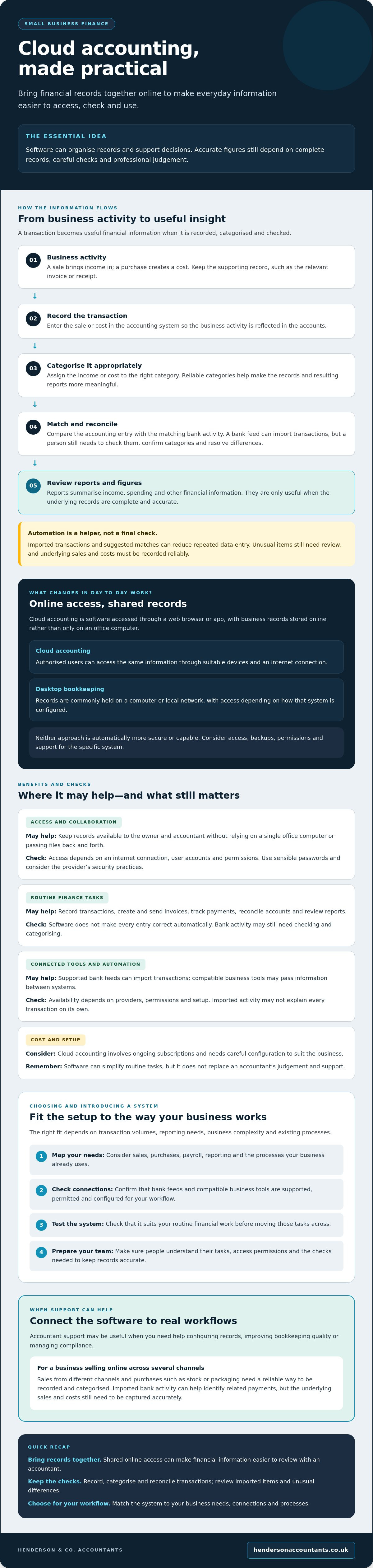
Cloud accounting is accounting software you access through a web browser or app, with business records stored online rather than only on one office computer. It gives authorised users a shared place to record transactions, raise invoices, reconcile accounts and review financial reports. For cloud accounting for small business, the practical aim is to keep everyday finance information organised and accessible, not to remove the need for accurate checks.
Accounting software can cover different financial tasks, but the tools vary by system. A cloud-based setup can bring records together so you can review your figures and work with an accountant without passing files back and forth. Access is controlled through user accounts and permissions. Sensible passwords, appropriate access settings and the provider’s security practices all matter. Storing records online does not, by itself, guarantee that they’re secure.
How is cloud accounting different from desktop bookkeeping?
With desktop bookkeeping, records are commonly held on a computer or local network, and access depends on how that system is configured. Cloud accounting stores records online, allowing authorised users to access the same information through suitable devices and an internet connection. Neither approach is automatically more secure or capable. Consider how access, backups, permissions and support are managed for the specific system.
Who can benefit from cloud accounting?
It may suit a small business that wants its financial records available to the owner and accountant without relying on a single office computer. For example, an online retailer selling through several channels may want a clearer, more organised way to record sales and purchases across the business. Whether cloud accounting is a good fit depends on transaction volumes, reporting needs, business complexity and existing processes.
In day-to-day use, the software can help you:
- Record sales, purchases and other transactions.
- Create and send invoices, then track what’s been paid.
- Compare accounting entries with bank activity through reconciliation.
- Review reports that summarise income, spending and other financial information.
These tools can make records easier to access, but they don’t make every entry correct automatically. A bank transaction may need checking and categorising, and reports are only useful when the underlying records are complete and accurate. Think of the system as a way to organise financial information and support decisions, rather than a substitute for careful bookkeeping or professional judgement.
How cloud accounting connects transactions, records and financial insight
A transaction becomes useful financial information when it’s recorded, categorised and checked. For example, after an online retailer makes a sale, the income needs to be entered in the accounts and assigned to the right category. A purchase follows a similar path: keep the supporting record, enter the cost and categorise it appropriately. Comparing the amount in the accounts with the matching bank transaction allows the entry to be reconciled.
That process creates a clearer trail from business activity to reported figures. It also shows why cloud accounting for small business is about more than storing records online. The quality of the information depends on how consistently transactions are recorded and reviewed.
What happens when bank feeds and business tools are connected?
Where supported and correctly configured, a bank feed can import account transactions into the accounting system. You or your bookkeeper can then match an incoming payment or outgoing cost to an invoice, receipt or other recorded item. Compatible business tools may also pass information between systems, but availability depends on the providers, permissions and setup. Check that the process suits your workflow before relying on it.
For instance, an online retailer selling through more than one channel may record sales from those channels alongside purchases such as stock or packaging. Imported bank activity can help identify related payments, but it doesn’t necessarily explain every transaction on its own. The business still needs a reliable way to record and categorise the underlying sales and costs.
Automation can import transactions, suggest matches and reduce repeated data entry, but a person must review unusual items, confirm categories and resolve differences to keep records accurate. Treat suggested matches as prompts to check, not proof that an entry is correct. This matters when amounts look similar or a payment covers several transactions.
How can shared access help an owner and accountant work together?
With appropriate permissions, an accountant can review the same records as the owner without relying on emailed copies of spreadsheets or files. If transactions are entered and categorised promptly, conversations can focus on specific questions, such as an unexpected cost or a change in available cash, rather than first piecing together incomplete records.
Current accounts can help you monitor money coming in and going out, spot overdue invoices and make more informed decisions about when to make purchases. They’re a guide, not a guarantee: reports reflect the information entered, and pending payments or missing records can change the picture. Set clear responsibilities for who records transactions, checks matches and manages user access. If you’d like support aligning the system with your bookkeeping process, explore accountant-supported cloud accounting setup.
Cloud accounting benefits and limitations: what small businesses should weigh
The value of cloud accounting depends on how well it fits your work, not simply on the fact that it’s online. For a small business, easier access and shared records can make routine financial reviews more convenient. Subscriptions, setup and ongoing checks still need to be part of the decision.
| Area | Potential benefit | What to weigh |
|---|---|---|
| Access | Authorised users can view records from suitable devices with an internet connection. | Access relies on connectivity and the provider’s service being available. |
| Collaboration | Owners and accountants can work from shared information rather than exchanging separate files. | Agree who can view or change records, and who is responsible for keeping them current. |
| Automation | Imported transactions and digital records can reduce repeated data entry. | Suggested matches and categories still need checking. Automation can’t correct incomplete bookkeeping on its own. |
| Oversight | Up-to-date records can make it easier to review income, spending and cash-flow movements. | Reports are only as reliable as the information entered and reviewed. |
Which benefits matter most to a small business?
Accessible records can help you and your accountant review routine activity without waiting for files to be passed between you. If transactions are entered promptly and categorised consistently, it may be easier to notice late customer payments or changes in spending. That can support better cash-flow awareness, but it can’t guarantee that funds will be available or that a decision will lead to a particular result. Software provides tools; accurate, well-maintained records provide the foundation.
What are the drawbacks or risks to consider?
Cloud accounting usually involves an ongoing subscription, and moving records, adjusting processes and training staff take time. You’ll also depend on a suitable internet connection and the provider’s systems. Before choosing, check how you can access and export your data, what backup arrangements apply, how the provider handles security, and what happens if you leave or the service changes.
Security deserves practical checks, not assumptions. Look for strong authentication options, such as multi-factor authentication, and give each user only the access they need. Check how user access can be removed when someone no longer needs it, and understand the provider’s approach to protecting and restoring records. These steps help manage risk, though no online or desktop system should be treated as automatically secure.
The best fit is a system that makes your financial work clearer without adding more complexity than it removes. Weigh the subscription and setup effort against the time, organisation and visibility you need, then assess cloud accounting for small business against your actual processes.
How to assess and introduce cloud accounting in your small business
A smooth move starts with your processes, not a software shortlist. Map how sales, purchases, payroll and reporting work now, including who records each item and when. This helps you identify what the new system must support and where a process may need attention before records are moved.
What should you check before choosing cloud accounting software?
Match the system’s functions to your business size, transaction types and reporting needs. Check whether it works with the banking, sales and payment tools you already use, and confirm that any connections are compatible and suitable for your workflows. Review user access controls, data handling, support arrangements and how you can export your records if you change provider. For UK tax and record-keeping requirements, consult current official guidance from HMRC rather than relying on an old software checklist.
Use this sequence to keep the decision practical:
- Review your needs. List the records and reports you rely on, from sales and purchases to payroll and management information.
- Compare suitable systems. Check required functions, compatibility, access controls, support and data export options against that list.
- Plan the move. Agree who will prepare and transfer historic information, set opening balances and confirm which records need to be retained.
- Test before relying on it. Enter sample transactions, check balances and compare reports with your existing records. Resolve differences before making the new system your main source of information.
- Prepare users and review routines. Show staff how to complete their tasks, assign permissions carefully and agree who will reconcile accounts and review records regularly.
How can you move across without losing control of the records?
Migration is more than copying figures. Decide who will prepare the information, who will check it and how you’ll confirm that opening balances agree with your existing accounts. Test representative sales, purchases and payroll entries, then review the resulting reports. Keep access to relevant old records while you establish that the new process is working as intended.
After launch, set clear responsibilities for recording transactions, reviewing unusual items and reconciling accounts. Schedule regular checks so errors or missing information can be addressed before they affect reports or compliance work. The right approach to cloud accounting for small business depends on the records you need and how your team works, so accountant-supported setup can help align the system with those workflows.
For help planning your records and software setup, explore Xero cloud accounting setup.
When accountant-supported cloud accounting makes sense for a small business
Cloud accounting can be straightforward to use, but setting it up well takes more than creating an account. Support may be useful if you’re unsure how to organise your records, configure the system around your processes or choose reports that answer practical questions. The aim isn’t to promote software for its own sake. It’s to make sure the system supports dependable bookkeeping and provides the information your business needs.
What can an accountant help you get right?
An accountant can help set up Xero to reflect how your business records income and costs, establish sensible workflows and consider who needs access to which information. They can also review bookkeeping so reports are based on well-organised records, and support relevant compliance work. Software can help process and present information, but it can’t replace professional judgement or make business decisions for you.
For an online retailer, sales across different channels can make it important to agree how income, fees, refunds and purchases should be recorded. A well-considered setup can help make those records more consistent and useful. It won’t remove the need to check entries or understand what the figures mean.
How can growing businesses decide what support they need?
Start with the task that’s causing the most difficulty. You may need help with:
- Setup: configuring Xero and agreeing how information should flow through your bookkeeping.
- Bookkeeping: keeping transaction records organised and reviewing their quality.
- Compliance: preparing relevant VAT returns, annual accounts or corporation tax returns.
- Broader finance support: understanding financial performance as reporting needs develop.
These needs can change as transaction volumes increase, you add sales channels or you need more regular reporting. A business that first needs help establishing a system may later benefit from bookkeeping or wider finance support. Review the work you currently manage in-house, the records you rely on and where delays or uncertainty arise. That gives you a clearer basis for deciding what support is useful, rather than paying for services you don’t need.
Henderson & Co. Accountants provides Xero cloud accounting setup, bookkeeping and compliance support to businesses across the UK. If you’re considering cloud accounting for small business and would like to discuss a setup that fits your workflows, you can talk to Henderson & Co. about cloud accounting.
Make your next accounting step work for your business
Cloud accounting for small business can make financial records easier to access and organise, but the real value comes from a setup that reflects how your business operates. Choose software around your transactions, reporting needs and existing processes, then plan the move carefully. Regular checks still matter: automation can reduce manual work, but accurate records rely on thoughtful bookkeeping and review.
Support can help if you’re unsure how to configure your system, maintain reliable records or connect reporting with compliance work. Henderson & Co. Accountants provides Xero cloud accounting setup and bookkeeping support, with specialist eCommerce accounting for online businesses. Its services are available to businesses across the UK.
If you’re ready to explore a setup suited to your workflows, Explore cloud accounting support for your business. With clear processes and the right support, you can build a more organised view of your finances and take your next steps with confidence.
Frequently Asked Questions
What is cloud accounting for a small business?
Cloud accounting for a small business is accounting software accessed through a browser or app, with records stored online. It can help you record sales and purchases, issue invoices, reconcile transactions and review reports. Authorised users can access shared records using suitable devices and an internet connection. The system helps organise financial information, but accurate results still depend on complete records and regular checks.
Is cloud accounting secure for a small business?
It can be secure, but no system should be treated as automatically safe. Check the provider’s security and data-handling practices, how records are backed up, and how you can retrieve them. Use strong, unique passwords and multi-factor authentication where available. Give each user only the access they need, review permissions regularly and remove access when it’s no longer required. Desktop systems also need appropriate security measures.
Can I do my own bookkeeping with cloud accounting software?
Yes, you can manage your own bookkeeping if you understand how to record, categorise and check your business transactions. Software may import bank activity or suggest categories, but you’ll still need to review entries, match them to supporting records and investigate differences. If transactions become difficult to manage, or you’re unsure whether records are complete, bookkeeping support can help improve their accuracy and usefulness.
Does cloud accounting software replace an accountant?
No. Cloud accounting software can organise records and automate some routine tasks, but it doesn’t replace an accountant’s professional judgement. An accountant can help configure the system, review bookkeeping, interpret reports and support compliance work such as VAT return preparation or annual accounts. You remain responsible for business decisions, using the figures alongside your knowledge of the business and advice relevant to your circumstances.
How much does cloud accounting cost for a small business?
Costs vary by provider and plan. The subscription may depend on the features, number of users or transaction limits included. Check whether functions you need, such as payroll or connections to other business tools, are included or charged separately. Also consider the time and effort involved in setup, training and moving records. Compare the full ongoing cost with the functions your business will actually use.
Can cloud accounting help with Making Tax Digital?
Cloud accounting may help you keep digital records and work with compatible tools, but using cloud software alone doesn’t establish that you meet Making Tax Digital requirements. The rules that apply depend on your circumstances and the relevant tax obligations. Check current HMRC guidance for your business before choosing a system, and confirm that its functions suit any requirements that apply to you.
How do I move my small business accounts to the cloud?
Start by mapping your sales, purchases, payroll and reporting needs, then choose software that fits those processes. Agree who will prepare and transfer historical records, set opening balances and check the information. Test sample transactions and reports against your existing accounts before relying on the new system. Set user permissions, train anyone who will use it and agree who will reconcile and review records regularly.


