

Have you ever looked at your Shopify sales report, then at your bank statement, and wondered why the numbers simply don't match? It's a frustrating moment that many UK business owners face every single month. You've made the sales, but by the time various payment gateway fees and VAT are accounted for, the final deposit often feels like a moving target. Mastering ecommerce payment reconciliation isn't just about tidy bookkeeping; it's about gaining total control over your cash flow and ensuring you aren't overpaying on your tax returns.
We know that spending hours buried in complex spreadsheets is the last thing you want to do when you're trying to grow a brand. You want your financial records to be accurate and audit-ready without the month-end headache. This guide provides a clear, repeatable process to help you align your online sales with your bank deposits. We'll show you how to identify hidden fees, manage HMRC compliance with confidence, and use Xero to create a streamlined workflow. By the end, you'll have the visibility you need to protect your profit margins and build your business on a stable foundation.
Key Takeaways
- Learn how the "Three-Way Match" framework bridges the gap between your gross sales and the actual deposits in your bank account.
- Identify the common causes of discrepancies, such as hidden gateway fees, to keep your HMRC reporting accurate and transparent.
- Master a simple, repeatable process for ecommerce payment reconciliation that saves you hours of manual work every month.
- Transition from reactive bookkeeping to proactive growth by using reconciled data to understand your true profit margins.
- Explore how centralising your data in Xero creates a stable foundation for scaling your online business with confidence.
Understanding eCommerce Payment Reconciliation and Its Role in Growth
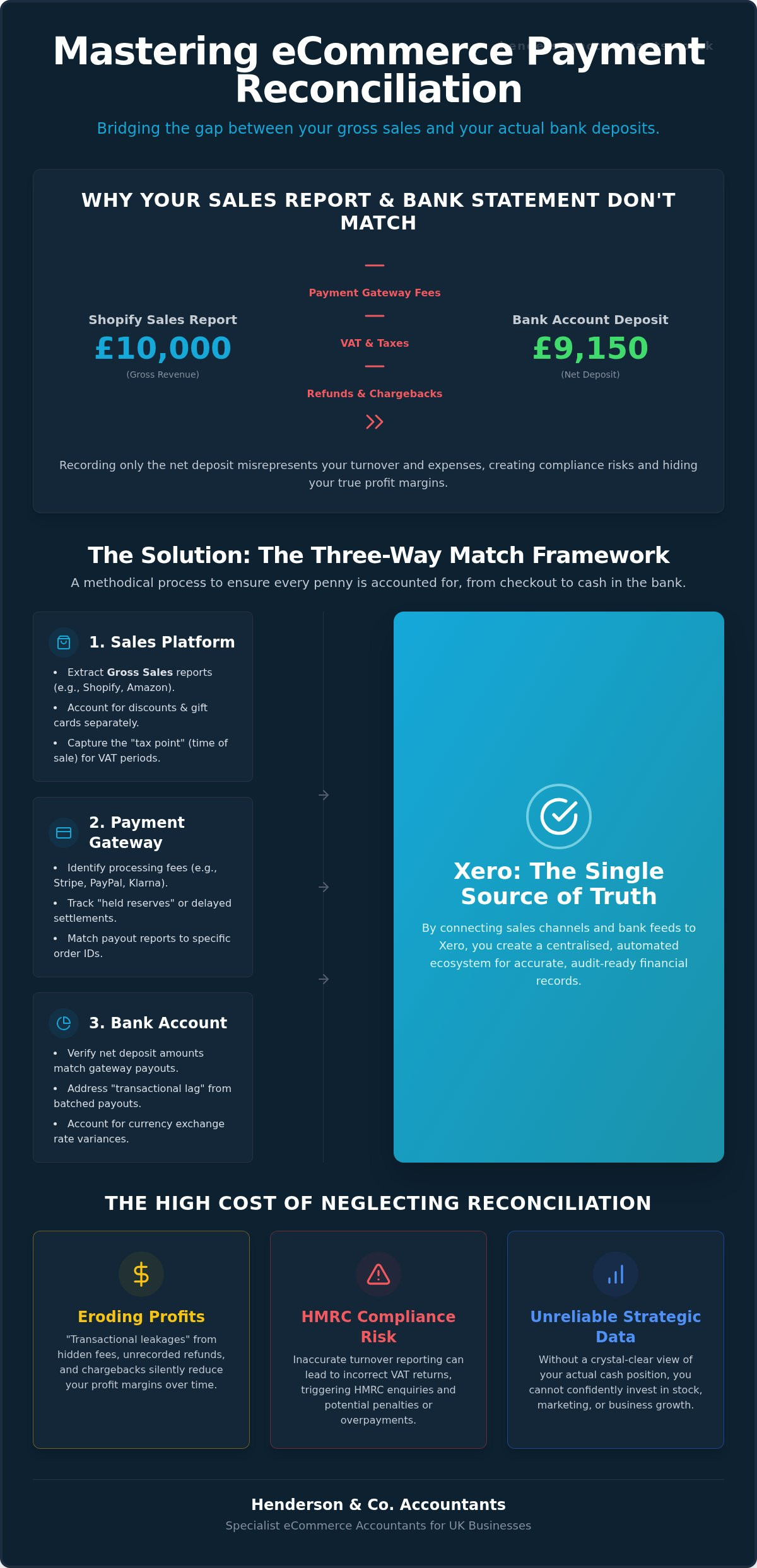
Ecommerce payment reconciliation is the methodical process of cross-referencing three core data sources: your sales platform (such as Shopify or Amazon), your Payment Service Provider (PSP) like Stripe or PayPal, and your business bank account. It's essentially a three-way check. You're ensuring that what your website says you sold matches what your payment processor collected, which in turn matches what actually landed in your bank. Without this process, you're essentially flying blind.
One of the most common pitfalls for UK sellers is the "gross vs net" trap. Your sales dashboard might show a high gross revenue figure, but your bank account only receives the net amount after payment fees are deducted. If you record the net amount in your accounts, you're misrepresenting both your turnover and your expenses. This matters for VAT compliance and it's also critical when you're looking to scale. Accurate data improves your business valuation because it shows a clear, audit-ready trail of every transaction, giving investors or lenders confidence in your numbers.
Why Traditional Bookkeeping Fails Online Retailers
Standard bookkeeping often struggles with the high volume and low value of ecommerce transactions. A traditional business might have ten large invoices a month; an online retailer might have thousands of small orders. The "batching" problem is a major hurdle. When a payment gateway deposits a lump sum into your account, it often represents hundreds of individual orders from several days ago. This "transactional lag" means that your bank balance on the last day of the month rarely reflects your actual sales for that period, making month-end reporting a nightmare without a proper system.
The Consequences of Poor Reconciliation
Neglecting your ecommerce payment reconciliation can lead to "transactional leakages" where small, hidden fees and unrecorded refunds quietly erode your profit margins. From a regulatory perspective, the risks are even higher. Inaccurate VAT returns can lead to HMRC enquiries or significant overpayments if you aren't correctly separating your sales from your fees. Ultimately, poor data prevents you from making proactive strategic decisions. You can't confidently invest in new stock or marketing if you don't have a crystal-clear view of your actual cash position.
The Mechanics of Reconciling Multi-Channel Sales Data
To keep your books accurate, you need a reliable framework that handles the complexity of selling across various platforms. We recommend the "Three-Way Match" framework. It's a straightforward logic: your sales platform says you sold an item, your payment gateway says they collected the funds, and your bank statement confirms you received the deposit. If any of these three points don't align, you have a discrepancy that needs investigating. This methodical approach ensures no order or fee slips through the cracks.
Xero acts as the single source of truth in this process. By connecting your sales channels and bank feeds directly to Xero, you create an automated ecosystem where data flows seamlessly. This is particularly useful when handling international transactions. If you sell in Dollars or Euros but report in Sterling, exchange rate variances can make your numbers look slightly off. A robust ecommerce payment reconciliation process accounts for these fluctuations automatically, ensuring your profit margins remain clear even when currency values shift. If you're looking to build this foundation, our experts can assist with Xero cloud accounting setup to get your data moving correctly.
Sales Platform Data: The Starting Point
Everything begins with extracting "Gross Sales" reports from Shopify, Amazon, or eBay. It's vital to pull the gross figure rather than just the payout amount. You must also account for discounts, gift cards, and promotional codes separately to ensure your turnover is reported correctly to HMRC. For UK sellers, capturing the exact time of sale is critical. This "tax point" determines which VAT period the transaction falls into, which is essential for staying compliant during busy month-end transitions.
Payment Gateway Data: The Missing Link
Payment gateways like Stripe, PayPal, and Klarna are often where reconciliation errors occur. These providers deduct their fees before the money reaches your bank account. To maintain a clean audit trail, you must record the gross sale and the gateway fee as two separate entries in your ledger. Mapping these payouts to specific order IDs is the only way to prove the origin of every penny. You should also watch out for "held reserves" or delayed settlements, as these can cause a temporary mismatch between your monthly sales and your actual bank deposits.
Identifying and Resolving Common Reconciliation Discrepancies
A discrepancy is essentially any mismatch between the revenue you expect to see and the actual cash that lands in your business account. When your records don't align, it's usually a sign that data has been lost or miscategorised somewhere along the chain. In our experience, human error is the primary cause of these headaches, especially in manual spreadsheet systems. A single mistyped digit or a forgotten row can throw your entire month-end out of balance, leading to hours of stressful detective work.
Timing differences also play a significant role in why your numbers might look "wrong" at first glance. For example, a high-volume weekend of sales might not be settled by your payment provider until the following Wednesday. If your month ends on that Sunday, your management accounts will show the sales revenue, but your bank balance won't reflect the cash yet. Understanding these lags is a vital part of ecommerce payment reconciliation; it allows you to stay calm and realise that the money is on its way, rather than missing.
If you're facing a mismatch, use this quick investigation checklist:
- Verify if any payouts are currently "in transit" or held in reserve by the provider.
- Check for orders that were cancelled but not correctly voided in your accounting software.
- Look for international transaction fees or currency conversion costs that weren't included in your initial estimates.
- Ensure that gift card purchases haven't been counted as double revenue when they're eventually redeemed.
Handling Refunds and Chargebacks
Refunds can be an accounting nightmare because they often appear weeks after the original sale was reconciled. This creates a "tail" of transactions that can distort your current month's performance. You must also be careful to reclaim the VAT on these items correctly; failing to do so means you're effectively giving HMRC money you don't owe. Chargebacks are even more complex. You're often hit with a separate administrative fee alongside the loss of the original inventory and the sale value.
Unmasking Hidden Gateway Fees
Many sellers are surprised by the variety of fees deducted by payment providers. You might see a mix of flat processing fees and percentage-based interchange fees, which can fluctuate depending on whether your customer used a premium credit card or a standard debit card. These small variations can quietly eat into your margins. By reconciling these fees down to the penny, you gain a true understanding of your net profit, allowing you to price your products more effectively and protect your bottom line.
A Step-by-Step Workflow for Accurate Monthly Reconciliations
Establishing a routine is the best way to replace month-end anxiety with calm control. You should aim to "close your books" by a set date each month, such as the 7th. This ensures your data remains fresh and any issues are caught quickly. A structured ecommerce payment reconciliation workflow is the backbone of this routine. It provides the evidence you need to satisfy an HMRC audit whilst giving you a clear view of your actual cash position.
Step 1: Data Collection and Standardisation
Start by downloading CSV exports from every sales channel and payment gateway you use. Don't rely on the high-level summaries; you need the raw transactional data. Organise this information into a unified format that includes the date, order ID, gross amount, fees, and the net total. If you sell internationally, verify that all figures are converted to Sterling at a consistent rate to avoid messy exchange rate discrepancies later on.
Step 2: Matching and Verification
This is where you match individual orders to gateway payouts using unique transaction IDs. Your goal is to ensure the total payout from your gateway matches the deposit on your bank statement exactly. If you find "unmatched" items, don't ignore them. Flag these for manual investigation by your eCommerce accountant. Resolving these small gaps early prevents them from snowballing into larger financial mysteries.
Step 3: Recording and Reporting
Once matched, post the reconciled totals into your Xero cloud accounting system. We recommend generating a "Reconciliation Discrepancy Report" for your internal records. This document is invaluable for VAT return preparation as it proves your figures are based on verified data. Finalising your month-end management accounts at this stage allows you to see your true business performance, free from the "noise" of pending settlements or unrecorded fees.
Documenting your process is just as important as doing the work. Keep a digital folder for each month containing your raw CSVs and your final reconciliation reports. This clear trail shows HMRC that you are proactive and organised, which is the best defence during any review. If you find this process overwhelming, our outsourced finance department can manage the entire workflow for you, ensuring your records stay perfect whilst you focus on growth.
Strategic Financial Management: Beyond Simple Data Matching
Once you've mastered the mechanics of ecommerce payment reconciliation, you unlock a level of financial intelligence that many business owners miss. It's no longer just about ticking boxes for HMRC; it's about turning your raw data into a strategic asset. By viewing this process as an investment in clarity rather than a monthly chore, you move away from reactive bookkeeping. You start building a stable foundation that supports ambitious scaling without the fear of hidden financial traps.
This shift in mindset is what separates a struggling shop from a thriving brand. When your records are clean, you aren't just looking at what happened last month. You're using that information to decide what happens next. This is the point where simple data entry evolves into proactive financial planning, giving you the confidence to reinvest in your business with certainty.
Using Reconciled Data for Cash Flow Forecasting
Accurate data allows you to predict future payouts with precision. Because you understand your settlement cycles and sales trends, you can forecast exactly when cash will hit your account. This visibility helps you identify which payment methods are actually the most profitable after all fees are stripped away. It also ensures you're never caught off guard by tax liabilities. You'll be able to set aside funds for your payments well in advance of any HMRC deadlines, keeping your cash flow steady and predictable.
The Role of an Outsourced Finance Director
This is where a strategic partner becomes invaluable. An outsourced finance department doesn't just manage the data; they use it to advise on your growth trajectory. They provide an expert eye on your corporation tax and VAT strategy, ensuring you're as tax-efficient as possible whilst remaining fully compliant.
Transitioning from manual spreadsheets to a fully automated, scalable finance function means you spend less time looking at the past and more time planning for the future. With a proactive guide by your side, you can make bold decisions based on facts, not guesswork. Whether you're considering a new product line or expanding into new territories, having reconciled, audit-ready data ensures your strategy is built on solid ground.
Take Control of Your eCommerce Finances Today
Mastering ecommerce payment reconciliation transforms your month-end from a stressful chore into a powerful strategic advantage. You now have the tools to bridge the gap between gross sales and bank deposits whilst ensuring your VAT reporting remains spotless. By moving away from manual spreadsheets and centralising your data in Xero, you eliminate the risk of human error and gain a crystal-clear view of your true profit margins. This visibility is exactly what you need to scale with confidence.
At Henderson & Co. Accountants, we specialise in Xero cloud accounting setup and provide expert outsourced finance director services for UK SMEs. We are dedicated to simplifying complex eCommerce tax compliance so you can focus on building your brand without the weight of financial uncertainty. Our team is here to act as your proactive partner, ensuring your records are always audit-ready and your cash flow is transparent.
Book a consultation with our eCommerce accounting specialists today to start your journey towards total financial clarity. Your business growth deserves a solid foundation; let's build it together with confidence and ease.
Frequently Asked Questions
What is the difference between bookkeeping and payment reconciliation?
Bookkeeping is the daily recording of your business transactions, whilst payment reconciliation is the specific act of proving those records are correct. Think of it as the final verification step. You're comparing your sales platform data against your bank statement to ensure every penny is accounted for. Without this step, your books might show sales that never actually reached your account, leading to inaccurate tax filings and poor cash flow visibility.
How often should I reconcile my eCommerce payments?
You should aim to reconcile your accounts at least once a month to align with your bank statements. However, for high-volume sellers, a weekly check is much more effective. Doing this more frequently allows you to spot discrepancies or gateway errors before they become complex puzzles at the end of the quarter. It keeps your financial data fresh and ensures you're always ready for your next VAT return preparation without the last-minute stress.
Do I need special software for eCommerce payment reconciliation?
Whilst you can use spreadsheets, we strongly recommend using Xero cloud accounting setup alongside a specialist integration tool like A2X or Link My Books. These tools automate the ecommerce payment reconciliation process by breaking down bulk payouts into individual sales and fees. This automation saves you hours of manual data entry and significantly reduces the risk of human error, providing a much more stable foundation for your business's financial health.
How do I handle international currency reconciliation for UK VAT?
When dealing with international sales, you must convert all transactions into Sterling using a consistent exchange rate for your VAT returns. Xero handles this automatically using daily market rates, but you still need to reconcile the final deposit against the original sale. This process accounts for any currency fluctuations that occurred between the customer clicking "buy" and the funds landing in your UK business account, ensuring your profit margins stay accurate.
Why does my Shopify report show more sales than my bank account has received?
This mismatch usually happens because Shopify reports your "Gross Sales," whilst your bank account receives the "Net Payout." Your payment processors, like Stripe or PayPal, deduct their transaction fees before sending the money to you. Additionally, there's often a settlement lag of a few days. Reconciliation helps you identify these hidden costs and timing differences, so you know exactly why your bank balance doesn't mirror your sales dashboard at any given moment.
Can I reconcile my accounts myself or do I need an accountant?
You can certainly manage the basics yourself, but many business owners find the complexity overwhelming as they scale. A specialist accountant doesn't just match numbers; they ensure you're fully compliant with HMRC rules and help you identify "transactional leakages." Professional ecommerce payment reconciliation provides an extra layer of security, giving you the peace of mind that your financial records are audit-ready and your profit margins are being protected.
What happens if I cannot find a match for a specific transaction?
If a transaction doesn't match, you should flag it for manual investigation immediately. Start by checking for partial refunds, chargebacks, or "held reserves" that your payment gateway might be keeping. It's also worth looking for manual adjustments or bank fees that haven't been recorded. Don't simply "write off" the difference; finding the root cause is essential to ensure your reporting remains accurate and your internal processes are working correctly.
How does payment reconciliation help with HMRC compliance?
Reconciliation provides the documented evidence HMRC requires during an audit. It proves that your VAT and tax returns are based on verified bank deposits rather than just sales platform estimates. By showing a clear trail from the initial order to the final sterling deposit, you demonstrate that your business is organised and transparent. This methodical approach reduces the risk of penalties and ensures you're only paying the tax you actually owe.


