

How many hours did you spend last month manually typing order data into a spreadsheet? It's a familiar story for many UK sellers. You started your WooCommerce store to build something great, but now you find yourself acting as a full-time data entry clerk, wrestling with Stripe fees and international VAT rates. We understand that as your sales climb, the manual approach doesn't just become tiring; it becomes a genuine risk to your HMRC compliance. With the April 2026 MTD for ITSA deadline already here for many, the pressure to maintain perfect digital records has never been higher.
This guide shows you how a professional woocommerce accounting integration can transform your business from a manual tangle into a streamlined, automated success story. You'll learn how to automate your financial data and ensure you're always on the right side of the taxman without the bookkeeping headache. We'll walk you through the steps to achieve real-time visibility of your profit margins and create a stable foundation for growth. By the end of this article, you'll have a clear roadmap to move from reactive box-ticking to proactive financial control and scalable success.
Key Takeaways
- Replace hours of manual data entry with automated workflows to eliminate human error and free up your time for growth.
- Master your woocommerce accounting integration to create a seamless flow of order, tax, and shipping data directly into your cloud software.
- Learn why Xero is the stable foundation for UK eCommerce, offering the best tools for managing complex VAT and payment reconciliation.
- Identify the common pitfalls in VAT mapping and payment fees that often lead to inaccurate reporting and HMRC compliance risks.
- Discover how professional guidance from an eCommerce accountant turns your financial data into a strategic asset for scaling your business.
The Cost of Manual Bookkeeping: Why WooCommerce Accounting Integration is Essential
Running a successful online store is a balancing act. You need to manage stock, handle customer queries, and keep the marketing engine running. However, many UK sellers find themselves trapped in a cycle of manual data entry that slows everything down. While WooCommerce is a highly versatile open-source e-commerce plugin, it doesn't manage your accounts for you. Without a direct link to your books, you're essentially running two separate businesses: the one that sells products and the one that tries to account for them. This manual gap is a hidden drain on your most precious resource: your time.
The landscape changed significantly on 6 April 2026. The rollout of Making Tax Digital (MTD) for Income Tax Self Assessment (ITSA) means that self-employed individuals and landlords with income over £50,000 must now keep digital records. Relying on paper or disconnected spreadsheets isn't just inefficient; it's a compliance risk. Implementing a woocommerce accounting integration isn't just about saving time anymore. It's about ensuring your business remains compliant with HMRC's digital-first requirements while giving you real-time visibility of your financial health. Instead of waiting for a month-end report that tells you what happened weeks ago, you get a clear picture of your profit margins as they happen.
The Risk of Inaccurate Data
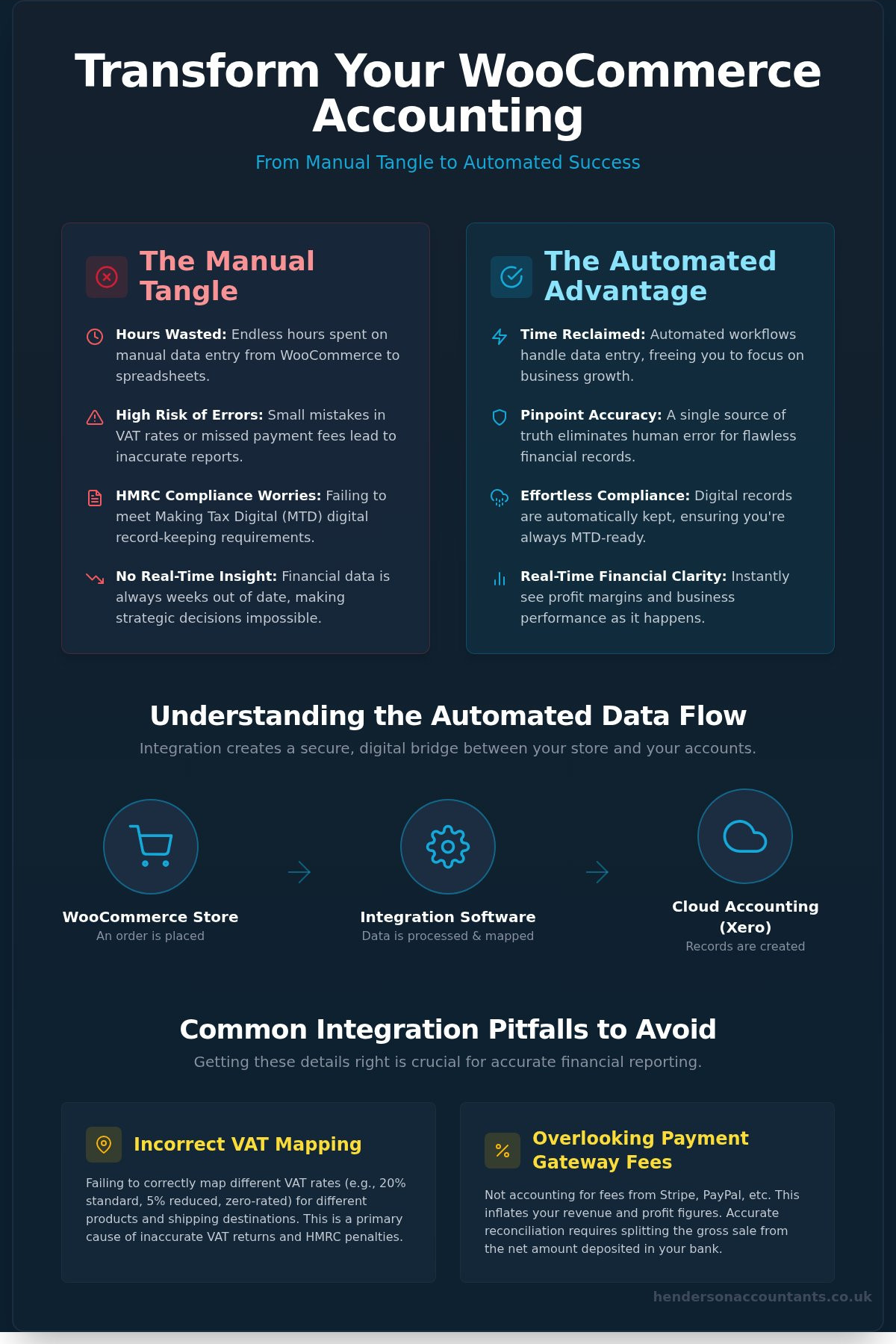
Manual spreadsheets are magnets for human error. When you're dealing with hundreds of transactions, it's easy to miscalculate a VAT rate or miss a PayPal fee. These small slips add up, leading to inaccurate VAT returns and potential fines. Tracking stock levels across multiple channels without automation is also a recipe for overselling and frustrated customers. A proper integration creates a single source of truth. It ensures that every penny is accounted for, from the initial click to the final bank reconciliation, giving you peace of mind that your numbers are actually correct.
Boosting Operational Efficiency
Automating your financial data flow changes the way you work. Instead of spending your weekends reconciling Stripe statements, you can focus on value-add tasks like marketing or product development. Automation allows you to scale your order volume without increasing your administrative headcount. You don't need to hire more people just to process more invoices. This efficiency is the first step toward building an outsourced finance department, where your systems do the heavy lifting. A woocommerce accounting integration turns your back-office from a bottleneck into a streamlined engine for success.
How WooCommerce Syncs with Cloud Accounting: Understanding the Data Flow
To get the most from your woocommerce accounting integration, you need to understand what's happening under the bonnet. Think of the integration as a digital bridge. On one side, you have your storefront; on the other, your financial ledger. They communicate through APIs (Application Programming Interfaces). These allow data to flow securely using high-level encryption, ensuring your sensitive business and customer information remains protected whilst investing in the right technology for your long-term growth. This secure connection removes the need for manual CSV exports and the constant risk of losing data in transit.
You can typically choose between real-time syncing or scheduled batching. Real-time updates are excellent for maintaining accurate stock levels across multiple channels. Alternatively, scheduled batching can make bank reconciliation easier by grouping daily sales into a single summary. You'll need to decide which data points are vital for your sync, including order totals, shipping costs, and specific VAT breakdowns. Most modern systems allow you to customise this flow to suit your specific business model and transaction volume.
Mapping Your Chart of Accounts
Correct categorisation is the secret to a stress-free tax season. You don't want your shipping income mixed with your product sales, as this makes it difficult to see where you're actually making money. Account mapping is the process of linking WooCommerce categories to specific ledger codes. This ensures that when a sale happens, the 20% standard VAT, 5% reduced rate, or 0% zero-rated items are all recorded in the right place automatically. If you're unsure how to structure this, our team can assist with your Xero cloud accounting setup to ensure every transaction is mapped perfectly from the start.
Managing Customer and Inventory Data
Beyond the numbers, your integration acts as a powerful tool for customer relationship management. Syncing customer profiles allows you to track lifetime value and buying patterns without digging through separate systems. For inventory, the system works both ways. When a sale occurs on WooCommerce, your ledger updates instantly. This prevents the nightmare of overselling items you no longer have in stock. The system also handles the messy bits, like processing refunds and cancellations, by automatically adjusting your accounts to reflect the returned funds and restocked items without any manual intervention.
Choosing the Right Software: Why Xero Leads the Way for UK eCommerce
Selecting the right platform is the most important decision you'll make when automating your finances. While several options exist, Xero has established itself as the gold standard for UK sellers. It isn't just about recording transactions; it's about building a stable foundation that grows with your brand. A successful woocommerce accounting integration relies on software that can handle the complexity of modern retail without feeling like a chore to use. Xero’s interface is designed for business owners, not just accountants, giving you the confidence to dive into your numbers and understand your true profit margins.
Scalability is a core strength here. Whether you're managing your first ten orders or navigating a multi-million pound turnover, the system adapts. It provides the clarity needed to make proactive decisions rather than just reacting to your bank balance. By choosing a platform that is already the preferred choice for UK eCommerce, you're joining a well-supported community with plenty of resources and expertise available to help you succeed.
Xero vs. Traditional Desktop Software
Moving away from old-fashioned, desktop-based systems is a game-changer for growing brands. Cloud-based access means you, your team, and your accountant can all view the same real-time data from any location. You don't have to deal with the headache of expensive server maintenance or manual backups. Automatic bank feeds are another huge advantage. They pull your transactions in daily, meaning reconciliation happens in minutes rather than being a dreaded weekend task. This speed keeps your ledger accurate and ready for review at a moment's notice.
The Power of the Xero App Marketplace
Xero’s real strength lies in its extensive ecosystem. Specialist tools like A2X or Link My Books act as a vital bridge, translating messy payout data from WooCommerce into clean, reconciled entries. These apps are particularly helpful for managing international sales and staying compliant with UK government VAT rules for online marketplaces. If you expand your reach to platforms like Amazon or eBay alongside your own site, Xero pulls all those different threads together. It creates one cohesive financial picture, ensuring your woocommerce accounting integration remains the heart of a wider, multi-channel strategy.
Avoiding Integration Pitfalls: VAT Mapping and Payment Reconciliation
Getting your woocommerce accounting integration live is a huge win for your business, but the work doesn't stop once the sync is active. A common mistake many UK sellers make is adopting a "set and forget" mentality. Software is incredibly efficient, but it's only as accurate as the rules you give it. If your settings are slightly off, you could be duplicating entries or missing vital tax deductions without realising it. Regular audits are essential to ensure your digital records remain a true reflection of your bank balance, especially as transaction volumes grow.
International sales add another layer of complexity. Since Brexit, navigating the Import One Stop Shop (IOSS) and various EU tax rules requires precision. If your integration isn't configured to identify the customer's location and apply the correct tax treatment, you could face unexpected bills or customs delays. Keeping a close eye on these settings ensures you stay on the right side of HMRC whilst maintaining a smooth experience for your global customers.
Solving the Payment Gateway Puzzle
Reconciling payments from providers like Stripe and PayPal is where many sellers stumble. When a customer spends £100, you don't receive £100 in your bank account; you receive the net amount after transaction fees. If your system only records the gross sale, your accounts will show more cash than you actually have. Your woocommerce accounting integration must be configured to split these fees out automatically. This allows you to track your true margins and ensures your bookkeeping matches your bank statements perfectly. If you're struggling to balance these figures, our team can help with VAT return preparation and payment reconciliation to get your books back on track.
Accurate VAT Mapping for UK Sellers
UK VAT is rarely one-size-fits-all. You likely deal with standard 20% rates, but you might also sell zero-rated or exempt items. Your WooCommerce store must be mapped to distinguish between these categories before the data hits your ledger. With the VAT registration threshold currently at £90,000, staying on top of your rolling 12-month turnover is vital. Once you cross that line, your integration becomes your best friend for MTD compliance. It ensures every domestic sale is recorded with the correct 20% VAT, making your quarterly submissions a matter of a few clicks rather than a week of spreadsheet stress. Accuracy here doesn't just save time; it protects your business from costly HMRC penalties.
Beyond the Software: How an eCommerce Accountant Optimises Your Integration
While a woocommerce accounting integration automates the flow of data, it doesn't make strategic decisions for you. Software is a powerful tool for recording what happened, but it cannot tell you why it happened or what you should do next. This is where the human element becomes vital. At Henderson & Co., we don't just set up your sync; we act as your proactive strategic partner. By functioning as your outsourced finance department, we help you move beyond basic bookkeeping and into high-level financial management that supports long-term growth.
The transition from manual entry to automated systems is the first step toward a more professional finance function. Once your store is connected to Xero, you gain a level of clarity that most small business owners lack. However, that data needs to be interpreted correctly to be useful. We bridge the gap between technical automation and business strategy, ensuring that your financial systems aren't just compliant, but are actually working to make your business more profitable.
Turning Data into Strategic Insight
Once your WooCommerce data flows cleanly into your ledger, you have a goldmine of information at your fingertips. We help you use this data to forecast cash flow and anticipate inventory needs months in advance. Instead of guessing which products are your winners, we identify your most profitable items and sales channels through detailed management accounts. Having an outsourced Finance Director on your team means you get expert analysis to help you scale with confidence. You'll understand your overheads and margins with total clarity, allowing you to reinvest profits where they'll have the biggest impact.
Stress-Free Compliance and Reporting
Compliance shouldn't be a source of anxiety. We ensure your annual accounts and corporation tax returns are filed accurately and on time. Because your woocommerce accounting integration ensures data is already organised and audited, we can provide real-time visibility into your tax liabilities. This means there are no nasty surprises when it's time to pay HMRC. This peace of mind is invaluable for a busy entrepreneur. We handle the technicalities of VAT, payroll, and company secretarial services, so you can stay focused on your customers. Ready to automate your store? Speak to our eCommerce accounting specialists today.
Take Control of Your Store's Financial Future
Implementing a woocommerce accounting integration is the single most effective way to reclaim your time and protect your business from compliance risks. By moving away from manual spreadsheets and embracing automated data flow, you gain real-time visibility of your profit margins and ensure your VAT reporting is always accurate. This shift allows you to focus on strategic growth rather than being bogged down by transaction fees and reconciliation errors.
At Henderson & Co., we act as more than just bookkeepers. As specialist eCommerce accountants and Xero Platinum Partners, we provide the strategic growth advisory needed to scale your brand with confidence. We help you turn complex financial data into a clear roadmap for success, ensuring your store is always ready for the next level of growth. You've worked hard to build your business; let us help you build a finance department that matches your ambition.
Ready to leave the manual bookkeeping headache behind? Get a professional Xero setup for your WooCommerce store today. We look forward to helping you build a more efficient, profitable, and stress-free online business.
Frequently Asked Questions
Do I need a special plugin to integrate WooCommerce with Xero?
Yes, you will need a connector to bridge the gap between your store and your ledger. While WooCommerce doesn't have a built-in sync, several reliable plugins and third-party apps facilitate this process. Options range from the official Xero extension to specialised tools like Link My Books, which group transactions for easier reconciliation. Choosing the right one depends on your order volume and whether you need to handle complex VAT requirements or multi-channel sales.
How does WooCommerce accounting integration handle VAT for international sales?
The system uses tax mapping to apply the correct rates based on your customer’s location. For international orders, a robust woocommerce accounting integration identifies whether a sale is domestic, within the EU under IOSS rules, or a rest-of-world export. It then assigns the appropriate VAT code in Xero automatically. This ensures your VAT returns are accurate without you having to manually check the tax status of every overseas parcel you ship to your customers.
Can I reconcile Stripe and PayPal fees automatically through the integration?
Yes, advanced integrations allow you to split gross sales from payment gateway fees automatically. Instead of seeing a single net deposit in your bank feed, the software records the full sale amount and a separate expense for the transaction fee. This gives you a true reflection of your turnover and your actual costs. It makes bank reconciliation a simple task of matching the totals rather than a manual calculation for every single order.
Will the integration sync my historical WooCommerce orders into Xero?
Most integration tools offer a historical sync feature, though it may be limited by your chosen plan or the age of the data. You can typically choose a specific start date to pull previous orders, customers, and inventory movements into Xero. It’s a great way to clean up your books if you’ve been using spreadsheets. However, we always recommend a trial run first to ensure old data maps correctly to your current chart of accounts.
Is WooCommerce accounting integration compliant with Making Tax Digital (MTD)?
Yes, using a woocommerce accounting integration is a key step in becoming MTD compliant. HMRC requires a digital link between your sales data and your tax return, which manual copy-pasting doesn't provide. By automating the flow of transactions into Xero, you create a transparent audit trail that meets the latest digital record-keeping requirements. This is especially vital following the April 2026 MTD for ITSA deadline for self-employed sellers and landlords with higher incomes.
How much does it cost to set up a WooCommerce accounting integration?
Costs vary depending on the complexity of your store and the tools you choose. You’ll typically pay a monthly subscription for the connector software, which scales based on your transaction volume. There is also the initial setup time to consider for mapping your accounts correctly. While there is an investment involved, most sellers find the cost is quickly offset by the hours of manual bookkeeping time they save every month by removing the need for data entry.
Can I manage multiple WooCommerce stores within one Xero account?
Yes, you can connect multiple WooCommerce storefronts to a single Xero organisation. To keep your data organised, you should use tracking categories in Xero. This allows you to see the profit and loss for each individual store whilst still having a consolidated view of your entire business. It’s an ideal setup for sellers running several niche brands who want to keep their overheads low by using one accounting subscription for all their different websites.
What happens if the sync fails or an order does not transfer?
If a sync fails, most integration tools provide an error log explaining why, such as a missing SKU or a tax mismatch. You can usually fix the underlying issue and trigger a manual push to resync that specific order. Modern systems are very reliable, but regular checks are still a good idea. Having a professional team monitor these logs ensures that no sales are missed and your financial records remain perfectly complete for your annual accounts.


