

Making Tax Digital changes how ecommerce sellers keep and submit tax records, rather than creating a new tax. Since April 2022, it has applied to all UK VAT-registered businesses, regardless of turnover; from April 2026, individuals with gross income over £50,000 from self-employment and/or property must also use Making Tax Digital for Income Tax, according to HM Revenue & Customs. Understanding Making Tax Digital for ecommerce starts with knowing which rules apply to your business.
Digital records, quarterly updates and software requirements can feel like another layer of admin. The practical answer depends on your business structure, VAT status and qualifying income, so online sellers may need to prepare for more than one MTD phase.
This guide explains what Making Tax Digital means for ecommerce, who needs to comply, what compatible software must do and how late-submission penalties work. It also covers the Income Tax rollout, so you can understand the relevant dates and prepare your records.
Key Takeaways
- Identify which MTD rules apply by considering your VAT status, business structure and qualifying income.
- Keep ecommerce sales and tax records digitally, with compatible software connecting the records to HMRC.
- Understand how late-submission points can lead to financial penalties, and why payment deadlines matter too.
- Prepare for future Income Tax requirements by reviewing your records and software ahead of the relevant phase.
- Use the article’s guidance to see where accounting support can help organise your ecommerce records and tax returns.
What is Making Tax Digital?
Making Tax Digital (MTD) is the UK government’s initiative for managing tax information digitally. It includes keeping digital records and submitting VAT returns through compatible software. For ecommerce sellers, VAT treatment can vary across UK sales, overseas orders, imports and marketplace-collected VAT. Record each category separately and retain details showing how each transaction was handled.
Digital tax record keeping
Digital tax record keeping means storing the financial information required for tax digitally, rather than relying only on paper. It gives you clear, retrievable evidence for figures reported to HMRC, including sales and expenses recorded through your online shop.
MTD does not change which tax records a business must keep. It changes how the business manages and submits tax information. Keep sales invoices and expense records in a digital system, with enough detail to trace each figure to its transaction. Records can be held in one place or across separate, digitally linked systems.
Recording and submitting tax information
Under MTD, digital records feed into software that manages tax information and submits it to HMRC. This matters for ecommerce businesses because sales, refunds, fees and expenses may be recorded across different platforms, while VAT return figures still need to be supported by underlying records.
For example, record a marketplace sale and its associated selling fee in your digital accounts, rather than relying on an untraceable total. MTD-enabled software can keep digital records, send information to HMRC and receive information from HMRC. It provides the reporting route, but you still need accurate underlying records.
Digital links and quarterly submissions
A digital link connects information from one digital record or software product to another, through to the MTD software used for submission. This matters if you use separate tools for orders, payments and bookkeeping: reported figures must pass between them digitally.
For example, a sales platform can pass transaction data to accounting software, which then sends VAT information to HMRC. Copying and pasting figures between digital platforms is not permitted under MTD. A connected process preserves the path from an individual transaction to the submitted figures, without manual re-entry between systems. VAT information is submitted quarterly through MTD-compatible software.
VAT and ecommerce sales
MTD for VAT applies to all UK VAT-registered businesses, regardless of turnover, from April 2022. The UK VAT registration threshold referenced here is £85,000 in taxable turnover; businesses below it can choose to register and file VAT returns digitally through MTD.
For each order, keep records that distinguish the sales channel, destination, VAT collected and any import-related information. For example, separate a direct website order from a marketplace transaction where the marketplace collects VAT. That way, your records show how each sale was treated. Overseas sales and imports can involve different VAT considerations, so retain transaction details instead of treating all ecommerce receipts as one total.
MTD-compatible accounting software
MTD software must keep digital records and connect your information to HMRC. For ecommerce sellers, the right setup depends on your sales channels and record-keeping methods, as well as whether you need to prepare for Income Tax as well as VAT.
What compatible software needs to do
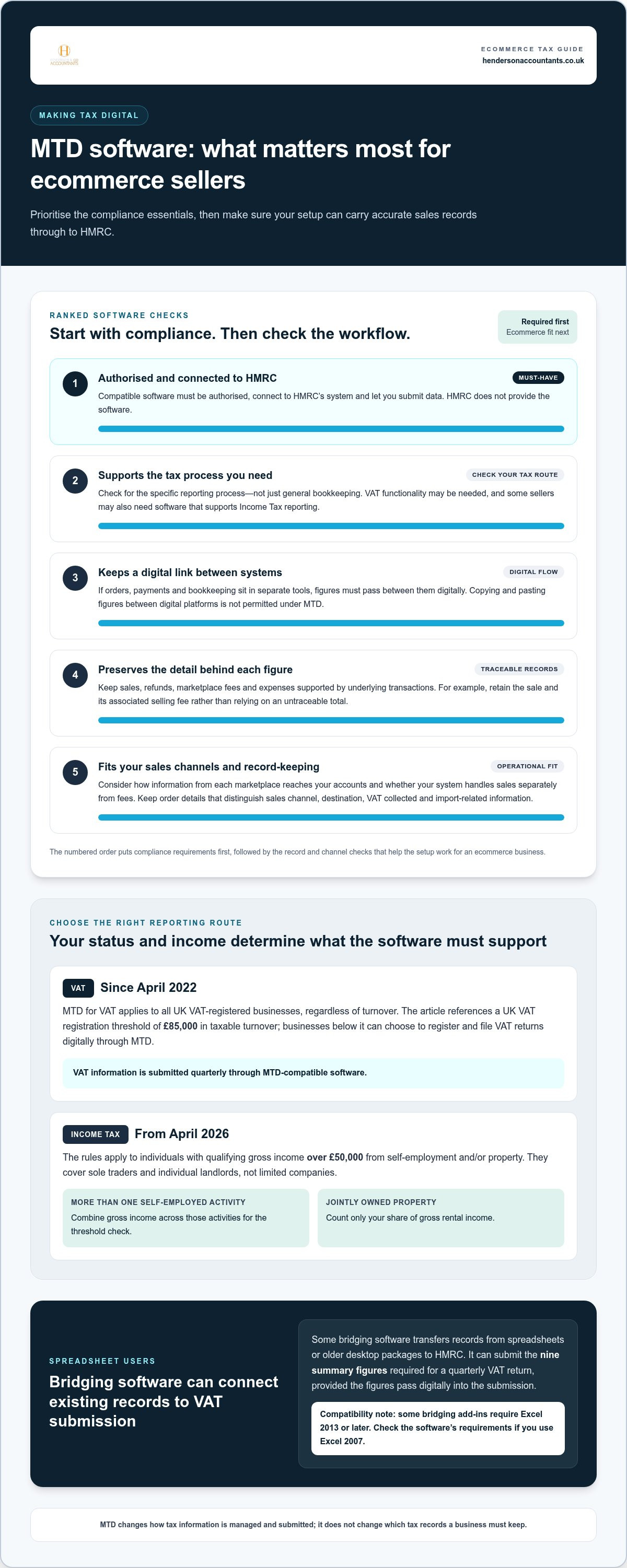
MTD-compatible software must be authorised, connect to HMRC’s system and let you submit data. HMRC does not provide the software, so your accounting system needs to provide this connection. Check that it supports the specific tax process you need, not just general bookkeeping.
For VAT, some bridging software transfers records from spreadsheets or older desktop packages to HMRC. It can submit the nine summary figures required for a quarterly VAT return. This may suit sellers who already manage detailed records in a spreadsheet, provided the figures pass digitally into the submission.
Software options for sole traders and landlords
Making Tax Digital for Income Tax applies to sole traders and individual landlords, not limited companies. From April 2026, the rules apply to individuals with qualifying gross income above £50,000 from self-employment and/or property. The software must support the relevant Income Tax reporting, rather than only VAT submissions.
If you sell through several marketplaces, consider how each channel’s sales information will reach your accounting records. A sole trader with more than one self-employed activity combines gross income across those activities for the threshold check. Landlords with jointly owned property count only their share of gross rental income.
Choosing MTD-compatible accounting software
Match your software to your business structure and reporting needs. An ecommerce seller registered for VAT may need VAT return functionality, while a sole trader or landlord within the Income Tax rules needs software for that process too. Check whether sales channels can pass records digitally into your accounting system.
Also assess how the system handles refunds, fees and expenses. For example, if a marketplace reports sales separately from its fees, the records should preserve both figures. Accounting support costs depend on transaction volumes, sales channels and the level of help required; a fee is provided after a quote request.
Bridging software and Excel compatibility
Bridging software may let you keep working with Excel whilst submitting VAT information digitally. Excel 2007 is a common compatibility query, and some bridging software add-ins require Excel 2013 or later. Check the required Excel version against the spreadsheet you use.
Some bridging tools support older .xls files and modern .xlsx files, but compatibility varies by tool. A spreadsheet that opens successfully may still need a compatible add-in to transfer figures. Before relying on that workflow, map how sales data moves from each marketplace into the spreadsheet and then into the submission software. ecommerce accounting support can help organise this software setup around your sales records.
Penalties for late submissions and payments
UK ecommerce businesses must submit applicable tax returns by their deadlines and pay tax owed on time. For VAT, HMRC uses a points-based system for late submissions: according to HM Revenue & Customs, a UK business receives a £200 penalty when its late VAT-return points reach the penalty point threshold. Separate penalties can apply when tax is paid late.
How late-submission points work
A late VAT return can add a point to your submission record. Once you reach the applicable threshold, a fixed financial penalty is issued. If you remain at the threshold, each subsequent late submission brings a further £200 penalty. The threshold depends on the submission frequency, so don’t assume that one missed return automatically triggers the fixed penalty.
This distinction matters when you prepare your filing routine. A late return may affect your points even if no tax is due, while an unpaid tax bill creates a separate payment issue. Keep evidence of submitted returns and payment dates together, so you can see whether a missed deadline relates to filing, payment or both.
Late payment is a separate risk
Submitting a return does not settle the amount due. Separate penalties may apply when tax owed is paid late, calculated as a percentage of the outstanding amount. The unpaid balance therefore affects the penalty, so review the amount shown after filing and arrange payment by its due date.
An ecommerce seller could submit a VAT return on time but pay the bill late, for example, and still face a payment penalty. Conversely, paying an estimated amount does not replace the requirement to submit a return. Keep filing and payment as separate tasks in your calendar.
Digital submission and practical preparation
VAT returns under MTD must be submitted using compatible software. Returns are no longer accepted by post or through the existing Government Gateway tool. Build submission into your quarterly close: reconcile marketplace and website records, review adjustments, then allow time to send the figures through your software before the deadline.
For Making Tax Digital for Income Tax, quarterly updates are due by the 7th of the month after each quarter-end. During the 2026 to 2027 tax year, HMRC will not apply penalty points for late quarterly updates in the first tax year of the service. This does not remove the need to submit updates or pay tax on time.
Set a calendar reminder for each return and payment date, and assign responsibility if someone else prepares the figures. If you miss a deadline, submit the outstanding return and pay any tax due as soon as possible. Keep confirmation emails and payment records so you can track what has been filed and paid.
Preparing for upcoming Making Tax Digital phases
The next major change is Making Tax Digital for Income Tax, which brings digital records and reporting to sole traders and individual landlords. Individuals in the UK with gross income from self-employment and/or property of more than £50,000 must use Making Tax Digital for Income Tax from April 2026, according to HM Revenue & Customs.
Know which income counts
The threshold uses qualifying income from self-employment and property before expenses, based on the tax return submitted in the previous year. For the April 2026 start, the relevant return is the 2024/25 tax return. This means a seller should look beyond one online shop or marketplace when assessing their position.
A sole trader combines gross income across all self-employed trading activities for the threshold check. Income from a website and several marketplaces, for example, is considered together, not separately for each sales channel. Keep a clear record of each activity to make the total easier to understand.
For jointly owned property, each owner counts only their share of gross rental income. If two people own a property equally and the rent is £24,000 annual rental income, each counts £12,000. That share is considered alongside any qualifying self-employment income.
Understand the later phases
The rollout extends to more sole traders and landlords through income-based phases. From April 2027, the threshold is £30,000 annual qualifying income. From April 2028, it is £20,000 annual qualifying income. These dates matter even if your current income sits below the first threshold, because business income can change.
MTD for Income Tax currently applies to sole traders and individual landlords, not limited companies. A limited company selling online should distinguish its company tax obligations from its owner’s personal self-employment or property income. The government’s phased approach applies to qualifying individuals, not every ecommerce business under the same Income Tax rules.
Prepare records before your phase begins
Start by separating business income from personal transactions and keeping digital records for each relevant source. Reconcile sales, refunds and platform fees against your bookkeeping, then identify any property income if you also let property. A consistent process makes it easier to spot errors before figures feed into tax updates.
MTD for Income Tax involves four cumulative quarterly updates, an End of Period Statement and a Final Declaration. Under the MTD process, the Final Declaration replaces the traditional Self Assessment return for the tax year. People joining MTD must still submit a Self Assessment tax return for the tax year before they start using the service. Prepare early by organising records and software around the phase that applies to you.
How do ecommerce sellers sign up for MTD and submit quarterly updates and year-end tax returns?
The process depends on whether you’re filing VAT returns or using Making Tax Digital for Income Tax. First identify which service applies, then enrol where needed and connect compatible software before submitting information. Keep records for each ecommerce activity so marketplace and website figures can be included accurately.
Signing up for the relevant service
HMRC automatically signs up new VAT-registered businesses for MTD for VAT, unless they are already exempt or have applied for exemption. Businesses below the VAT registration threshold can also choose to register and submit VAT returns digitally. Once signed up, use compatible software to file VAT returns, not post or the existing Government Gateway tool.
For Income Tax, you must be registered for Self Assessment and have submitted a tax return in the last 2 years before signing up. The online process asks sole traders for their business name, address and nature of business. You may also need to prove your identity using an app and details from a current passport or driving licence. Add every self-employment or property source that applies.
People required to use MTD for Income Tax for the 2026 to 2027 tax year should sign up now. HMRC starts signing up those who haven’t enrolled themselves from September 2026. After signing up, HMRC sends a confirmation email within 24 hours.
Submitting quarterly updates
For Income Tax, compatible software sends cumulative quarterly updates, which build on the figures reported earlier in the tax year. According to HM Revenue & Customs, the first UK MTD quarterly update covers 6 April to 5 July and is due by 7 August.
The following updates cover 6 April to 5 October, due by 7 November, and 6 April to 5 January, due by 7 February. The fourth covers 6 April to 5 April and is due by 7 May. These dates make it useful to reconcile marketplace sales, refunds and expenses before each update, rather than assembling the records at filing time.
Completing the year-end reporting
Quarterly updates don’t complete the year-end process. For Income Tax, you also submit an End of Period Statement and a Final Declaration. The Final Declaration brings together the year’s information and replaces the traditional Self Assessment return under the MTD process. The tax return is due by 31 January following the relevant tax year.
For VAT, use MTD-compatible software to submit each return and keep its submission confirmation with the underlying records. Arrange support with ecommerce tax submissions if you need help preparing returns and keeping the reporting process organised.
Henderson & Co. Accountants: eCommerce Accounting
Henderson & Co. Accountants supports ecommerce businesses with accounting that connects day-to-day sales records to tax reporting. If marketplace and website transactions make bookkeeping difficult, eCommerce Accounting can help organise those records. Xero Cloud Accounting Setup supports a digital accounting workflow, while VAT Return Preparation helps with VAT filing. Limited companies can also use Corporation Tax Returns support.
This support can be useful when you’re preparing for MTD, changing accounting software or organising ecommerce figures across multiple sales channels. Discuss the accounting and tax support that fits your business with Henderson & Co. Accountants. Contact the team to talk through your ecommerce accounting needs.
Make your next MTD step a practical one
Understanding Making Tax Digital for ecommerce is most useful when it leads to a workable routine for your business. Choose a next step that fits your setup: organise how sales records reach your accounts, review how you prepare VAT information, or plan for the reporting requirements that apply to you. A manageable process helps fit tax administration around the daily demands of selling online.
Henderson & Co. Accountants supports ecommerce businesses with eCommerce Accounting, Xero Cloud Accounting Setup and VAT Return Preparation. This can help you bring ecommerce records into an accounting workflow or prepare VAT returns. Start with the part of your current process that takes the most effort to maintain.
To discuss support for your ecommerce accounting, contact Henderson & Co. Accountants. A clearer process can help you approach your next tax task with confidence.
Henderson & Co. Accountants and Making Tax Digital
Henderson & Co. Accountants offers eCommerce Accounting, Bookkeeping, Xero Cloud Accounting Setup and VAT Return Preparation. These services help manage the accounting work connected with your ecommerce business.
If you need help putting your accounting processes in place or preparing VAT returns, contact Henderson & Co. Accountants to discuss the services that fit your needs.
Frequently Asked Questions
What digital records do I need to keep?
Keep digital records supporting your business income, expenses and tax figures, including sales invoices, refund details and purchase records. For each ecommerce order, retain enough information to trace the recorded sale to its source and identify related adjustments. If a marketplace statement combines sales and fees, preserve the underlying breakdown too. Clear transaction-level records make it easier to explain how totals in your accounts were calculated.
When do retailers need to comply?
Retailers registered for VAT must use MTD for VAT, regardless of turnover. For Income Tax, the start date depends on an individual’s qualifying gross income from self-employment and property. A sole trader with a shop and marketplace sales should consider the combined income from those activities, not treat each channel separately. Limited companies are not brought into MTD for Income Tax, although their VAT registration may make MTD for VAT relevant.
Are any businesses exempt from MTD?
Yes. HMRC may exempt a business if its circumstances prevent it from meeting MTD requirements. Possible grounds include disability, insolvency proceedings or religious beliefs that conflict with using electronic devices or keeping electronic records. An exemption is not automatic just because a business prefers paper records or finds a software change inconvenient. Consider whether your circumstances affect your ability to comply, and use the appropriate HMRC process to apply.
Can an accountant handle MTD reporting for me?
An accountant can support MTD record keeping and help prepare VAT returns, reducing the work involved in organising sales data and checking figures. For example, an ecommerce accountant can help reconcile marketplace statements with bookkeeping entries before preparing a return. Henderson & Co. Accountants offers eCommerce Accounting and VAT Return Preparation. You’ll still need to provide accurate business records and track your responsibilities and submission deadlines.
Do Amazon FBA sellers need to follow MTD rules?
Using Amazon FBA does not by itself determine whether MTD applies. The relevant factors are your VAT registration and, for Income Tax, your qualifying income and business structure. Keep records separating Amazon sales, refunds, fees and other sales channels, so you can trace the figures in your accounts. An FBA seller should assess the same UK MTD criteria as any other ecommerce business, rather than relying on fulfilment method alone.
Does MTD apply to limited companies?
MTD for Income Tax currently applies to sole traders and individual landlords, not limited companies. However, a limited company registered for VAT must follow MTD for VAT. Keep the company’s VAT reporting separate from an owner’s personal tax position. For example, a director who also earns self-employment or property income may need to assess personal MTD eligibility independently of the company’s VAT obligations.
Does it apply to my business?
Check your business structure and tax position separately. If you’re VAT-registered, MTD for VAT applies regardless of turnover. If you’re a sole trader or individual landlord, assess qualifying income from self-employment and property against the relevant Income Tax phase. A limited company’s status does not determine whether its director has personal MTD duties. Understanding Making Tax Digital for ecommerce starts with separating these business and personal obligations.
How do I register for MTD?
For VAT, HMRC automatically signs up new VAT-registered businesses unless they’re exempt or have applied for exemption. For Income Tax, you must be registered for Self Assessment and have submitted a tax return in the last 2 years. Sign-up asks for business details, and you may need identity documents. After enrolment, connect compatible software to the relevant income sources so reporting can reflect the activities you actually carry out.


