

Most eCommerce sellers think they're losing money on marketing, but the real drain is often hidden in a messy spreadsheet of uncounted stock and guessed margins. It's exhausting to spend your evenings manually typing order data or trying to figure out why your Cost of Goods Sold (COGS) doesn't match your bank balance. You likely started your brand to create something great, not to become a full-time data entry clerk. Learning how to manage inventory in xero for ecommerce shouldn't feel like a second job that keeps you up at night.
We understand that as your business grows, the complexity of tracking international stock and reconciling VAT only increases. This guide shows you how to gain real-time stock visibility and automate your accounting workflows using Xero’s native features and powerful integrations. We'll explore how to keep your financial reports clean and HMRC-compliant whilst freeing up your time to actually run your business. From mastering COGS to choosing the right tech stack, you'll discover a more organised way to scale your brand with confidence and clarity.
Key Takeaways
- Understand the difference between tracked and untracked inventory to choose the most efficient method for your product range and sales volume.
- Learn how to manage inventory in xero for ecommerce by correctly mapping your Asset and COGS accounts for automated, real-time financial reporting.
- Identify the signs that your multi-channel brand has outgrown native tools and requires expert integrations to prevent overselling across Shopify or Amazon.
- Ensure your business remains HMRC-compliant by accurately linking inventory valuation to your Corporation Tax and VAT records.
- Discover how a bespoke Xero ecosystem designed by specialists can replace manual data entry with a scalable, professional finance department.
Understanding Your Options: Tracked vs. Untracked Inventory in Xero
Deciding between tracked and untracked inventory is the first big hurdle when learning how to manage inventory in xero for ecommerce. Both methods serve a purpose, but they change how you interact with your financial data every day. Choosing the wrong path early on can lead to messy reconciliations later, so it's vital to pick the system that aligns with your current volume and growth plans. Effective inventory management is less about counting every single bolt and more about ensuring your balance sheet reflects the true value of what's sitting on your warehouse shelves.
When to choose Untracked Inventory
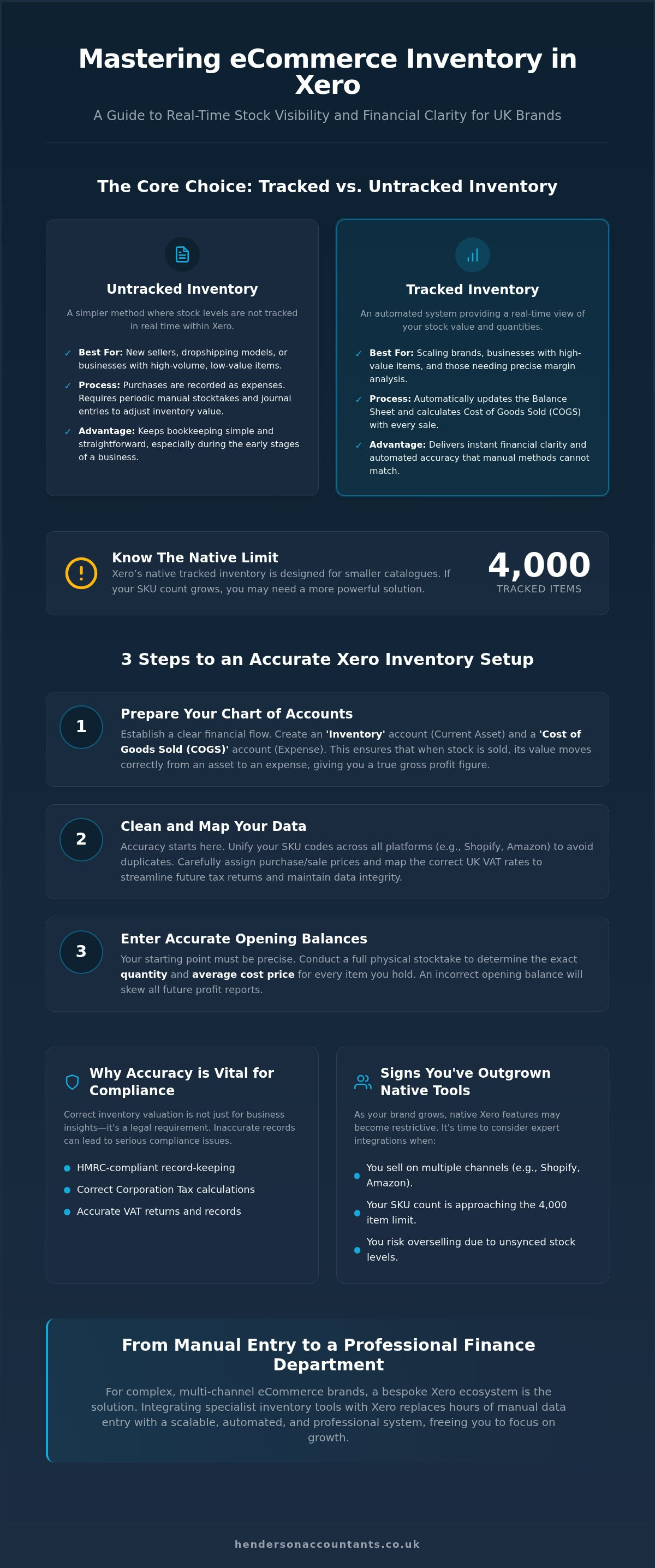
Untracked inventory is often the best starting point for new sellers or those with a high volume of low-value items. In this setup, Xero doesn't keep a running tally of your stock levels. Instead, you simply record purchases as expenses and sales as revenue. To keep your accounts accurate, you'll need to perform a manual stocktake periodically and use a manual journal to adjust your inventory value. This method is particularly popular for dropshipping models because you never actually hold the stock yourself, making real-time tracking unnecessary. It keeps your bookkeeping simple whilst you're still finding your feet in the market.
When to choose Tracked Inventory
If you want a professional, real-time view of your business health, tracked inventory is the way to go. With this option, Xero automatically updates your Balance Sheet every time you buy or sell a product. It's a proactive approach that gives you instant clarity on your margins because the software calculates your Cost of Goods Sold (COGS) with every single invoice. For high-value items, this visibility is non-negotiable. You'll need to be diligent about your opening balances when you first set this up, but the reward is a level of automated accuracy that manual spreadsheets simply can't match. It's a key part of how to manage inventory in xero for ecommerce for brands that want to scale without losing control of their finances.
There is one specific boundary to keep in mind: Xero’s native tracked inventory is designed for smaller catalogues. Xero recommends a limit of 4,000 tracked items. If your SKU list is approaching this number or if you're selling across multiple platforms like Amazon and Shopify, the native tool might start to feel restrictive. For businesses with thousands of variations or complex multi-location needs, we often recommend moving towards a dedicated integration whilst keeping Xero as the clean, reliable core of your finance department. This ensures your reports stay fast and your data remains uncluttered as you grow.
A Step-by-Step Guide to Setting Up Native Inventory in Xero
Setting up your system correctly from day one prevents hours of forensic accounting later. To master how to manage inventory in xero for ecommerce, you must first prepare your Chart of Accounts. Ensure you have an "Inventory Asset" account, usually a Current Asset, and a "Cost of Goods Sold" account, which is an Expense. These two accounts work in tandem. When you buy stock, its value sits in the Asset account. When you sell it, Xero automatically moves that cost to the COGS account. It's a clean, logical flow that gives you a true reflection of your gross profit.
Preparing your data for import
Before you hit the import button, spend time cleaning your SKU codes. If your Shopify SKUs don't match your Amazon ones, Xero will treat them as different items, creating a data nightmare. Assign your purchase and sale prices carefully. Most importantly, ensure your VAT rates are mapped according to UK VAT rules for online marketplaces. Getting this right now means your VAT returns will be far more straightforward, whilst ensuring your data remains accurate. If you feel overwhelmed by the technical mapping, our team can help with a professional Xero cloud accounting setup to ensure everything is configured perfectly.
Refining how to manage inventory in xero for ecommerce requires an accurate starting point. Once your list is clean, you'll need to enter opening balances. This is the physical stock you have on hand on the day you start tracking in Xero. You must provide the quantity and the average cost price for every item. Without a precise count, your future COGS figures will be skewed, making your profit reports unreliable.
Managing stock adjustments and write-offs
Real-world eCommerce is rarely perfect. Items get damaged in transit or you might send out promotional giveaways to influencers. Xero handles this through "Inventory Adjustments." You should perform a physical stocktake at least once a quarter to ensure your digital records match what's actually on the shelf. If you find a discrepancy, use an adjustment to decrease your stock levels and record the value as a "Damaged Stock" or "Marketing" expense. This keeps your balance sheet honest and ensures you aren't paying tax on assets you no longer own.
When Xero Native Isn’t Enough: Managing Multi-Channel eCommerce
Native Xero inventory is a fantastic starting point, but multi-channel selling often pushes it to the brink. If you're wondering how to manage inventory in xero for ecommerce while juggling Shopify, Amazon, and eBay, you'll quickly find that data silos are your biggest enemy. Without a central "brain" to coordinate these platforms, you risk the dreaded oversell: selling your last unit on eBay whilst a Shopify customer is simultaneously checking out. This lag in data sync doesn't just frustrate customers; it can lead to marketplace penalties that threaten your seller rating.
The multi-channel sync dilemma
Managing different pricing tiers and stock locations requires more than just a spreadsheet. When you use Fulfilment by Amazon (FBA) alongside your own warehouse, Xero’s native tool can’t easily distinguish between the two pools of stock. This is where middleware apps become essential. They act as a bridge, ensuring that every sale on every platform updates your master stock count instantly. This prevents the reputational damage of cancelled orders and helps you manage inventory effectively across your entire digital footprint.
Scaling your tech stack safely
Knowing exactly when to upgrade is vital for maintaining your margins. We typically see three main trigger points for moving beyond native Xero. First is SKU volume; as you approach the 4,000-item ceiling we mentioned earlier, system performance can dip. Second is the need for "assemblies" or bundles, where selling one kit reduces the stock of several individual components. Third is the requirement for multi-warehouse tracking, especially if you're storing goods in different tax jurisdictions.
Before committing to new software, conduct a requirements audit. Tools like A2X are brilliant for cleaning up messy Amazon and Shopify payouts, whilst Cin7 Core or Unleashed offer robust control for complex operations. The goal is to ensure your chosen app integrates seamlessly with your Xero Chart of Accounts, keeping your finance department organised without manual intervention. Balancing the cost of these subscriptions against the time saved is a key step in learning how to manage inventory in xero for ecommerce at scale. It's about building a stable foundation that allows you to focus on growth rather than troubleshooting sync errors.
Why Accurate Inventory is Vital for UK VAT and Tax Compliance
Many sellers focus on sales growth whilst overlooking the fact that HMRC treats your stock as a financial asset. If you're learning how to manage inventory in xero for ecommerce, you must realise that your valuation directly dictates your Corporation Tax bill. If your stock value is recorded incorrectly at year-end, your profit figures will be skewed. Overstating your stock can lead to a higher tax bill than necessary, whilst understating it might trigger an unwanted HMRC enquiry. Keeping precise records ensures your annual accounts are a true reflection of your business health and that you aren't paying more tax than you owe.
Inventory valuation methods and HMRC
Xero uses the Average Cost method for its tracked inventory. This means it calculates a weighted average based on the price you paid for all units currently in stock. Whilst this is generally accepted by HMRC, you must also consider the "Lower of Cost or Net Realisable Value" rule. If you have stock that's become obsolete, damaged, or can no longer be sold at its original price, its value on your balance sheet should be adjusted down. Documenting this methodology is crucial for your accountant to ensure your tax return is accurate. Clear documentation provides peace of mind if you're ever asked to justify your figures during a routine check.
VAT considerations for international sellers
For those selling beyond UK borders, inventory management becomes even more complex. If you use Amazon FBA and move stock between EU warehouses, these "transfers of own goods" are often VAT-reportable events. You need clean data to support your OSS (One Stop Shop) or IOSS filings and to ensure you're correctly accounting for Postponed VAT Accounting (PVA) on imports. Under Making Tax Digital (MTD) rules, these records must be kept digitally with clear links between your sales platforms and Xero. Manual adjustments should be kept to a minimum to maintain the digital audit trail HMRC expects. It's about ensuring every stock movement is traceable and tax-compliant.
Managing these moving parts requires a proactive approach to your finance department. We specialise in helping brands navigate these hurdles, ensuring your tech stack and tax strategy work in harmony. If you want to ensure your business stays on the right side of the rules, let us handle your VAT Return Preparation and year-end compliance so you can focus on scaling your brand.
Expert Xero Setup: How Henderson & Co. Optimises Your eCommerce Finance
Henderson & Co. acts as more than just a service provider; we're a collaborative ally in your brand's journey. Whilst many firms offer basic data entry, we specialise in building a complete Outsourced Finance Department that handles the heavy lifting of multi-channel reconciliation. We understand that knowing how to manage inventory in xero for ecommerce is about more than just software settings. It's about creating a stable foundation where your Amazon, Shopify, and eBay data flows into a clean, audit-ready balance sheet without manual interference. This technical precision replaces financial anxiety with a sense of calm control.
Our approach to Xero eCommerce setup
We design your system to ensure data integrity from the moment a customer clicks 'buy' to the final year-end report. Our team doesn't just set up the software and leave you to it. We provide ongoing support to ensure your COGS and margins remain accurate as you introduce new products or enter new markets. By mapping your specific sales architecture, we provide custom management reporting that highlights your best-performing SKUs. This clarity allows you to stop guessing and start making profitable, data-driven decisions about your stock levels and marketing spend. It's a proactive way to protect your margins.
Partnering for long-term growth
Scaling a brand requires your full attention on product development and marketing, not on troubleshooting sync errors or worrying about VAT compliance. By acting as your Outsourced Finance Director, we provide the strategic oversight that automated software simply cannot match. We look ahead to identify tax-saving opportunities and ensure your business is structured for maximum efficiency whilst you scale. This proactive guidance ensures your back-end finance department stays ahead of the curve as your order volume grows.
A clean set of books is the starting point for a successful exit or a major funding round. We help you demonstrate the true value of your inventory and the strength of your margins to investors and HMRC alike. If you're ready to move beyond manual spreadsheets and gain real-time visibility into your business health, Book a consultation with our eCommerce accounting specialists today. We'll help you master how to manage inventory in xero for ecommerce so you can focus on building the brand you've always envisioned.
Take Control of Your eCommerce Growth
Mastering how to manage inventory in xero for ecommerce is the difference between guessing your profits and knowing them. By choosing the right tracking method and automating your multi-channel data, you remove the manual errors that stall growth. You've seen how accurate stock valuation protects your margins and keeps you on the right side of HMRC. It's about turning your finance department into a tool for strategy rather than a source of stress.
As Certified Xero Platinum Partners and specialist eCommerce accountants, we're here to help you build a professional ecosystem. Whether you need a bespoke cloud setup or the strategic oversight of an Outsourced Finance Director, we ensure your tech stack is a stable foundation for scaling. Get a Professional Xero Setup for Your eCommerce Business to replace spreadsheet anxiety with clear, actionable insights.
Your brand deserves a finance system that works as hard as you do. We're ready to help you take that next step with confidence and clarity.
Frequently Asked Questions
Can I use Xero for inventory if I sell on multiple platforms like Shopify and Amazon?
Yes, you can, but Xero doesn't natively synchronise stock levels across different platforms. To avoid overselling, most sellers use an integration that acts as a central hub. This ensures that a sale on Shopify immediately updates the available stock shown on Amazon. It's a vital part of learning how to manage inventory in xero for ecommerce without manual errors. Without this bridge, you risk creating significant data silos that lead to cancelled orders.
What is the difference between tracked and untracked inventory in Xero?
Tracked inventory is a proactive system where Xero updates your balance sheet and calculates COGS automatically with every sale. Untracked inventory is a reactive method where you record stock purchases as immediate expenses. With untracked stock, you only adjust your financial records after a physical stocktake using manual journals. Tracked inventory offers better real-time visibility but requires more diligent data entry to remain accurate and useful for your finance department.
How does Xero calculate the Cost of Goods Sold (COGS)?
Xero uses the average cost method to determine your COGS. It calculates a weighted average by dividing the total cost of items on hand by the current quantity. When you process a sale, Xero moves this average value from your Inventory Asset account to your Cost of Goods Sold account. This ensures your profit margins reflect the actual price paid for your stock over time rather than just the latest purchase price you paid.
Is there a limit to how many inventory items I can have in Xero?
Xero is designed to handle up to 4,000 tracked inventory items efficiently. Whilst you can technically exceed this number, you might notice the software becomes slower or reporting takes longer to generate. If your brand manages a massive catalogue or thousands of SKU variations, we recommend using a dedicated inventory app. This keeps your Xero account clean whilst providing the robust tracking capabilities a high-volume business requires to scale without technical barriers.
Do I need a third-party app for my eCommerce inventory management?
You should consider an app if you sell on more than one platform or need to track stock across different warehouses. Native Xero is excellent for smaller operations, but it lacks the automation needed for complex multi-channel scaling. If you find yourself spending hours every week manually updating stock levels or reconciling payouts, an integration will save you time and provide the peace of mind that your financial data is always correct.
How do I handle stocktakes and adjustments in Xero?
You can manage discrepancies through the Inventory Adjustment tool in the products and services section. If a stocktake reveals you have fewer items than Xero shows, you simply decrease the quantity and assign the cost to an expense account like Shrinkage or Damaged Goods. Performing these adjustments at least once a quarter ensures your digital records stay aligned with your physical warehouse, which is essential for producing accurate, HMRC-compliant financial reports.
Can Xero handle multiple warehouse locations natively?
No, Xero's native tracked inventory only supports one logical location. It treats all your stock as being in one single pool. If you need to distinguish between stock held at Amazon FBA and items in your own warehouse, you'll need an external inventory management system. These apps sync with Xero to provide the location-specific data that native tools currently lack, ensuring your balance sheet remains accurate across all your storage facilities.
How does inventory management affect my UK Corporation Tax?
Your stock valuation directly impacts your profit and loss statement. Because inventory is a current asset, your year-end stock value is subtracted from your total purchases to calculate your COGS. A higher stock value means a lower COGS and a higher reported profit, which increases your Corporation Tax liability. This is why learning how to manage inventory in xero for ecommerce accurately is so important for your annual tax planning and overall business compliance.


